EVPN in the Datacenter: Part 2 - EVPN with centralized routing
Introduction
This blog post is a continuation of my series about EVPN in the datacenter.
It continues where we left off with Part 1.
As mentioned in the first blog post, I highly recommend Dinesh G. Dutt's books,
BGP in the Data Center and EVPN in the Data Center, which I relied on heavily.
The purpose of this series is to show, step by step, how to configure a small simulated
datacenter. As a reminder, here is our lab's layout:
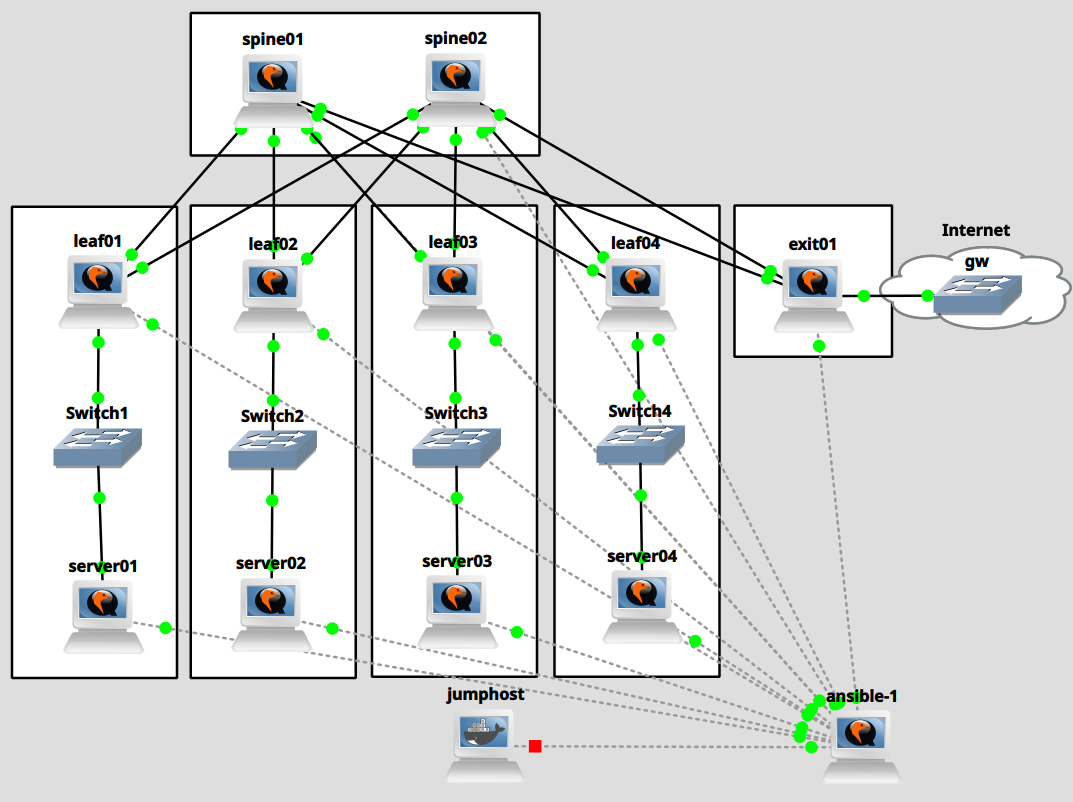
This blog post deals with the simplest type of EVPN setup: centralized routing. We will add VLANs
100 and 101 to the racks belonging to leaf01 and leaf02 and VLANs 102 and 103 to the racks belonging
to leaf03 and leaf04; the leaf nodes will connect the VLANs to VXLAN tunnels with matching VNI numbers.
The exit node, as the centralized router, will have VXLAN tunnel endpoints for all 4 VNIs 100
through 103.
VXLAN EVPN will enable our leaf and exit nodes to discover each other's tunnel endpoints.
When a server wants to communicate with another server on the same subnet, it sends out its frames
via the VLAN. The leaf switch then forwards the frame via the VXLAN tunnel to the corresponding
tunnel endpoint (another leaf switch). From there, the frame travels to the destination server.
When a server wants to communicate with a server on another subnet or with the internet, it sends
its frames to its gateway. In all cases, this is the exit node. Frames travel VXLAN-encapsulated
to the exit node, where the packets are routed to the correct subnet and sent out via the destination
VXLAN or to the internet.
The most interesting part is VXLAN EVPN's job: auto-discovery and setup of remote VXLAN
tunnel endpoints.
Enabling EVPN in the network
As a first step, we need to enable the l2vpn evpn address-family on all nodes in our virtualized
datacenter that participate in BGP. This setup is relatively trivial: we only need to activate
our neighbors inside address-family l2vpn evpn. The leaf and exit nodes must also be configured
to advertise all VNIs via advertise-all-vni. Because the exit node serves as our default gateway,
it will advertise a default route via advertise-default-gw.
Spine nodes
Modify file templates/setup-spine-frr.j2. Modify the configuration as follows:
 1
 2
 3
 4
 5
 6
 7
 8
 9
10
11
12 | (...)
router bgp {{ autonomous_system }}
(...)
address-family ipv4 unicast
redistribute connected route-map permitted_subnets
maximum-paths 64
exit-address-family
address-family l2vpn evpn
neighbor ISL activate
exit-address-family
exit
!
|
Run ansible:
| [root@ansible-1 ansible]# ansible-playbook setup-spine.yaml
|
We can now verify that l2vpn evpn is enabled on the spines but it hasn't been negotiated, yet:
 1
 2
 3
 4
 5
 6
 7
 8
 9
10
11
12
13
14
15 | [root@spine01 ~]# vtysh -c 'show bgp l2vpn evpn summary'
BGP router identifier 10.0.0.201, local AS number 65200 VRF default vrf-id 0
BGP table version 0
RIB entries 0, using 0 bytes of memory
Peers 5, using 118 KiB of memory
Peer groups 1, using 64 bytes of memory
Neighbor V AS MsgRcvd MsgSent TblVer InQ OutQ Up/Down State/PfxRcd PfxSnt Desc
ens4 4 65101 73 73 0 0 0 00:03:07 NoNeg NoNeg N/A
ens5 4 65102 73 73 0 0 0 00:03:06 NoNeg NoNeg N/A
ens6 4 65103 74 73 0 0 0 00:03:06 NoNeg NoNeg N/A
ens7 4 65104 72 72 0 0 0 00:03:05 NoNeg NoNeg N/A
ens8 4 65250 72 72 0 0 0 00:03:04 NoNeg NoNeg N/A
Total number of neighbors 5
|
Leaf nodes
Modify file templates/setup-leaf-frr.j2. Modify the configuration as follows:
 1
 2
 3
 4
 5
 6
 7
 8
 9
10
11
12
13
14
15
16 | (...)
router bgp {{ autonomous_system }}
(...)
address-family ipv4 unicast
redistribute connected route-map permitted_subnets
maximum-paths 64
neighbor SERVERS default-originate
neighbor SERVERS route-map default_only out
neighbor SERVERS route-map anycast_only in
exit-address-family
address-family l2vpn evpn
neighbor ISL activate
advertise-all-vni
exit-address-family
exit
!
|
Run ansible:
| [root@ansible-1 ansible]# ansible-playbook setup-leaf.yaml
|
We can now verify that l2vpn evpn is enabled on the leaves and that BGP is ready to exchange prefixes
between the leaves and the spines.
 1
 2
 3
 4
 5
 6
 7
 8
 9
10
11
12 | [root@leaf01 ~]# vtysh -c 'show bgp l2vpn evpn summary'
BGP router identifier 10.0.0.101, local AS number 65101 VRF default vrf-id 0
BGP table version 0
RIB entries 0, using 0 bytes of memory
Peers 2, using 47 KiB of memory
Peer groups 2, using 128 bytes of memory
Neighbor V AS MsgRcvd MsgSent TblVer InQ OutQ Up/Down State/PfxRcd PfxSnt Desc
ens3 4 65200 31 29 0 0 0 00:00:44 0 0 N/A
ens4 4 65200 31 29 0 0 0 00:00:44 0 0 N/A
Total number of neighbors 2
|
 1
 2
 3
 4
 5
 6
 7
 8
 9
10
11
12
13 | [root@spine01 ~]# vtysh -c 'show bgp l2vpn evpn summary'
BGP router identifier 10.0.0.201, local AS number 65200 VRF default vrf-id 0
BGP table version 0
RIB entries 0, using 0 bytes of memory
Peers 5, using 118 KiB of memory
Peer groups 1, using 64 bytes of memory
Neighbor V AS MsgRcvd MsgSent TblVer InQ OutQ Up/Down State/PfxRcd PfxSnt Desc
ens4 4 65101 350 355 0 0 0 00:01:07 0 0 N/A
ens5 4 65102 350 355 0 0 0 00:01:07 0 0 N/A
ens6 4 65103 352 355 0 0 0 00:01:07 0 0 N/A
ens7 4 65104 350 354 0 0 0 00:01:07 0 0 N/A
ens8 4 65250 344 349 0 0 0 00:16:02 NoNeg NoNeg N/A
|
Exit node
Modify file templates/setup-exit-frr.j2. Modify the configuration as follows:
 1
 2
 3
 4
 5
 6
 7
 8
 9
10
11
12
13
14 | (...)
router bgp {{ autonomous_system }}
(...)
address-family ipv4 unicast
network 0.0.0.0/0
maximum-paths 64
exit-address-family
address-family l2vpn evpn
neighbor ISL activate
advertise-all-vni
advertise-default-gw
exit-address-family
exit
!
|
Run ansible:
| [root@ansible-1 ansible]# ansible-playbook setup-exit.yaml
|
We can now verify that l2vpn evpn is enabled on the exit node and that BGP is ready to exchange prefixes
between all BGP nodes.
 1
 2
 3
 4
 5
 6
 7
 8
 9
10
11
12 | [root@exit01 ~]# vtysh -c 'show bgp l2vpn evpn summary'
BGP router identifier 10.0.0.250, local AS number 65250 VRF default vrf-id 0
BGP table version 0
RIB entries 0, using 0 bytes of memory
Peers 2, using 47 KiB of memory
Peer groups 1, using 64 bytes of memory
Neighbor V AS MsgRcvd MsgSent TblVer InQ OutQ Up/Down State/PfxRcd PfxSnt Desc
ens3 4 65200 35 32 0 0 0 00:00:54 0 0 N/A
ens4 4 65200 35 32 0 0 0 00:00:54 0 0 N/A
Total number of neighbors 2
|
 1
 2
 3
 4
 5
 6
 7
 8
 9
10
11
12
13
14
15 | [root@spine01 ~]# vtysh -c 'show bgp l2vpn evpn summary'
BGP router identifier 10.0.0.201, local AS number 65200 VRF default vrf-id 0
BGP table version 0
RIB entries 0, using 0 bytes of memory
Peers 5, using 118 KiB of memory
Peer groups 1, using 64 bytes of memory
Neighbor V AS MsgRcvd MsgSent TblVer InQ OutQ Up/Down State/PfxRcd PfxSnt Desc
ens4 4 65101 631 636 0 0 0 00:15:06 0 0 N/A
ens5 4 65102 631 636 0 0 0 00:15:06 0 0 N/A
ens6 4 65103 633 636 0 0 0 00:15:06 0 0 N/A
ens7 4 65104 631 635 0 0 0 00:15:06 0 0 N/A
ens8 4 65250 635 645 0 0 0 00:01:45 0 0 N/A
Total number of neighbors 5
|
Analyzing BGP packet captures at this stage
Let's now briefly look at BGP messages with Wireshark when we clear a BGP neighbor session with
clear ip bgp *. The following messages were captured between exit01 and spine02.
At this stage, the OPEN message will announce EVPN l2vpn capabilities:
 1
 2
 3
 4
 5
 6
 7
 8
 9
10
11
12
13
14
15
16
17
18
19
20
21
22
23
24
25
26
27
28
29
30
31
32
33
34
35
36
37
38
39
40
41
42 | Border Gateway Protocol - OPEN Message
Marker: ffffffffffffffffffffffffffffffff
Length: 141
Type: OPEN Message (1)
Version: 4
My AS: 65250
Hold Time: 9
BGP Identifier: 10.0.0.250
Optional Parameters Length: 112
Optional Parameters
Optional Parameter: Capability
Optional Parameter: Capability
Optional Parameter: Capability
Parameter Type: Capability (2)
Parameter Length: 6
Capability: Multiprotocol extensions capability
Type: Multiprotocol extensions capability (1)
Length: 4
AFI: Layer-2 VPN (25)
Reserved: 00
SAFI: EVPN (70)
Optional Parameter: Capability
Optional Parameter: Capability
Optional Parameter: Capability
Optional Parameter: Capability
Optional Parameter: Capability
Parameter Type: Capability (2)
Parameter Length: 10
Capability: Support for Additional Paths
Type: Support for Additional Paths (69)
Length: 8
AFI: IPv4 (1)
SAFI: Unicast (1)
Send/Receive: Receive (1)
AFI: Layer-2 VPN (25)
SAFI: EVPN (70)
Send/Receive: Receive (1)
Optional Parameter: Capability
Optional Parameter: Capability
Optional Parameter: Capability
Optional Parameter: Capability
Optional Parameter: Capability
|
And some of the UPDATE messages will contain an empty Withdrawn Routes list for l2vpn:
 1
 2
 3
 4
 5
 6
 7
 8
 9
10
11
12
13
14 | Border Gateway Protocol - UPDATE Message
Marker: ffffffffffffffffffffffffffffffff
Length: 29
Type: UPDATE Message (2)
Withdrawn Routes Length: 0
Total Path Attribute Length: 6
Path attributes
Path Attribute - MP_UNREACH_NLRI
Flags: 0x80, Optional, Non-transitive, Complete
Type Code: MP_UNREACH_NLRI (15)
Length: 3
Address family identifier (AFI): Layer-2 VPN (25)
Subsequent address family identifier (SAFI): EVPN (70)
Withdrawn Routes
|
However, not much more is happening. Our BGP setup is ready for l2vpn. But we aren't announcing our VNIs,
yet.
Adding VLANs and EVPN VNIs
The next step is to configure the actual overlay. We will add VLANs to the servers and leaves.
The leaves will also need a configuration for the VXLAN tunnel endpoints.
Due to how FRR's implementation of l2vpn evpn works, it requires us to set up a bridge which
connects a VLAN interface with VLAN ID x to a VXLAN interface with VNI x. For example, you will
see below that we add br100 as a controller of vlan100 and vxlan100. With this setup, FRR
can autodiscover our VNIs and will take care of the EVPN setup automatically.
As a reminder, we will add VNIs 100 and 101 to the first 2 racks, and VNIs 102 and 103 to the
next 2 racks. The exit node, as the central router, will be configured with VNIs 100 through 103.
Adding VLANs to the servers
Create the following ansible playbook to add VLANs to the servers:
 1
 2
 3
 4
 5
 6
 7
 8
 9
10
11
12
13
14
15
16
17
18
19
20
21
22
23
24 | cat <<'EOF' > setup-server-vlans.yaml
---
- name: Server VLAN setup
hosts: servers
tasks:
- name: Set up VLANs
ansible.builtin.template:
src: templates/server-vlan.j2
dest: "/etc/NetworkManager/system-connections/vlan{{ vni.id }}.nmconnection"
mode: 0600
loop: "{{ vnis }}"
loop_control:
loop_var: vni
- name: Reload connections
ansible.builtin.command:
cmd: "nmcli conn reload"
- name: Bring up VNIs
ansible.builtin.shell:
cmd: "nmcli conn up vlan{{ vni.id }}"
loop: "{{ vnis }}"
loop_control:
loop_var: vni
EOF
|
And create the necessary template:
 1
 2
 3
 4
 5
 6
 7
 8
 9
10
11
12
13
14
15
16
17
18
19
20 | cat <<'EOF' > templates/server-vlan.j2
[connection]
id=vlan{{ vni.id }}
type=vlan
interface-name=vlan{{ vni.id }}
[ethernet]
[vlan]
id={{ vni.id }}
parent={{ vni.parent_interface }}
[ipv4]
method=manual
address1={{ vni.local_ip }}/{{ vni.mask }}
[ipv6]
addr-gen-mode=eui64
method=disabled
EOF
|
We then add the following setup to the servers' host_vars:
 1
 2
 3
 4
 5
 6
 7
 8
 9
10
11
12
13
14
15
16
17
18
19
20
21
22
23
24
25
26
27
28
29
30
31
32
33
34
35
36
37
38
39
40
41
42
43
44
45
46
47
48
49
50
51
52
53
54
55
56
57
58
59
60 | cat <<'EOF' >> host_vars/server01
vnis:
- id: 100
parent_interface: ens3
subnet: 172.16.100.0
gateway: 172.16.100.1
mask: 24
local_ip: 172.16.100.101
- id: 101
parent_interface: ens3
subnet: 172.16.101.0
gateway: 172.16.101.1
mask: 24
local_ip: 172.16.101.101
EOF
cat <<'EOF' >> host_vars/server02
vnis:
- id: 100
parent_interface: ens3
subnet: 172.16.100.0
gateway: 172.16.100.1
mask: 24
local_ip: 172.16.100.102
- id: 101
parent_interface: ens3
subnet: 172.16.101.0
gateway: 172.16.101.1
mask: 24
local_ip: 172.16.101.102
EOF
cat <<'EOF' >> host_vars/server03
vnis:
- id: 102
parent_interface: ens3
subnet: 172.16.102.0
gateway: 172.16.102.1
mask: 24
local_ip: 172.16.102.103
- id: 103
parent_interface: ens3
subnet: 172.16.103.0
gateway: 172.16.103.1
mask: 24
local_ip: 172.16.103.103
EOF
cat <<'EOF' >> host_vars/server04
vnis:
- id: 102
parent_interface: ens3
subnet: 172.16.102.0
gateway: 172.16.102.1
mask: 24
local_ip: 172.16.102.104
- id: 103
parent_interface: ens3
subnet: 172.16.103.0
gateway: 172.16.103.1
mask: 24
local_ip: 172.16.103.104
EOF
|
Now, apply the changes:
| [root@ansible-1 ansible]# ansible-playbook setup-server-vlans.yaml
|
After applying the changes, connect to the servers and verify that the VLAN interfaces were
correctly added:
| [root@server01 ~]# ip a ls dev vlan100
10: vlan100@ens3: <BROADCAST,MULTICAST,UP,LOWER_UP> mtu 1500 qdisc noqueue state UP group default qlen 1000
link/ether 0c:ba:53:a9:00:00 brd ff:ff:ff:ff:ff:ff
inet 172.16.100.101/24 brd 172.16.100.255 scope global noprefixroute vlan100
valid_lft forever preferred_lft forever
[root@server01 ~]# ip a ls dev vlan101
11: vlan101@ens3: <BROADCAST,MULTICAST,UP,LOWER_UP> mtu 1500 qdisc noqueue state UP group default qlen 1000
link/ether 0c:ba:53:a9:00:00 brd ff:ff:ff:ff:ff:ff
inet 172.16.101.101/24 brd 172.16.101.255 scope global noprefixroute vlan101
valid_lft forever preferred_lft forever
|
Adding VNIs to the leaf nodes
As explained earlier, we add interfaces br<x>, vlan<x>, and vxlan<x> to the leaf nodes. We'll
use the following playbook:
 1
 2
 3
 4
 5
 6
 7
 8
 9
10
11
12
13
14
15
16
17
18
19
20
21
22
23
24
25
26
27
28
29
30
31
32
33
34
35
36
37
38
39
40 | cat <<'EOF' > setup-leaf-vnis.yaml
---
- name: Leaf VNI setup
hosts: leaves
tasks:
- name: Set up VNIs VXLAN
ansible.builtin.template:
src: templates/vni-vxlan.j2
dest: "/etc/NetworkManager/system-connections/vxlan{{ vni.id }}.nmconnection"
mode: 0600
loop: "{{ vnis }}"
loop_control:
loop_var: vni
- name: Set up VNIs VLAN
ansible.builtin.template:
src: templates/vni-vlan.j2
dest: "/etc/NetworkManager/system-connections/vlan{{ vni.id }}.nmconnection"
mode: 0600
loop: "{{ vnis }}"
loop_control:
loop_var: vni
- name: Set up VNIs BR
ansible.builtin.template:
src: templates/vni-br.j2
dest: "/etc/NetworkManager/system-connections/br{{ vni.id }}.nmconnection"
mode: 0600
loop: "{{ vnis }}"
loop_control:
loop_var: vni
- name: Reload connections
ansible.builtin.command:
cmd: "nmcli conn reload"
- name: Bring up VNIs
ansible.builtin.shell:
cmd: "nmcli conn up br{{ vni.id }} && nmcli conn up vlan{{ vni.id }} && nmcli conn up vxlan{{ vni.id }}"
loop: "{{ vnis }}"
loop_control:
loop_var: vni
EOF
|
We will also need the templates for those interfaces:
1
2
3
4
5
6
7
8
9
10
11
12
13
14
15
16
17 | cat <<'EOF' > templates/vni-vxlan.j2
[connection]
id=vxlan{{ vni.id }}
type=vxlan
controller=br{{ vni.id }}
interface-name=vxlan{{ vni.id }}
port-type=bridge
[vxlan]
id={{ vni.id }}
learning=true
local={{ loopback_address }}
proxy=false
destination-port=4789
[bridge-port]
EOF
|
1
2
3
4
5
6
7
8
9
10
11
12
13
14
15
16
17 | cat <<'EOF' > templates/vni-vlan.j2
[connection]
id=vlan{{ vni.id }}
type=vlan
controller=br{{ vni.id }}
interface-name=vlan{{ vni.id }}
port-type=bridge
[ethernet]
[vlan]
flags=1
id={{ vni.id }}
parent={{ vni.parent_interface }}
[bridge-port]
EOF
|
1
2
3
4
5
6
7
8
9
10
11
12
13
14
15
16
17
18
19
20 | cat <<'EOF' > templates/vni-br.j2
[connection]
id=br{{ vni.id }}
type=bridge
interface-name=br{{ vni.id }}
[ethernet]
[bridge]
stp=false
[ipv4]
method=disabled
[ipv6]
addr-gen-mode=eui64
method=disabled
[proxy]
EOF
|
We now add VNIs 100 and 101 to the racks with leaf01 and leaf02. We add VNIs 102 and 103 to the
racks with leaf03 and leaf04.
1
2
3
4
5
6
7
8
9
10
11
12
13
14
15
16
17
18
19
20
21
22
23
24
25
26
27
28 | cat <<'EOF' >> host_vars/leaf01
vnis:
- id: 100
parent_interface: ens5
- id: 101
parent_interface: ens5
EOF
cat <<'EOF' >> host_vars/leaf02
vnis:
- id: 100
parent_interface: ens5
- id: 101
parent_interface: ens5
EOF
cat <<'EOF' >> host_vars/leaf03
vnis:
- id: 102
parent_interface: ens5
- id: 103
parent_interface: ens5
EOF
cat <<'EOF' >> host_vars/leaf04
vnis:
- id: 102
parent_interface: ens5
- id: 103
parent_interface: ens5
EOF
|
Run ansible:
| [root@ansible-1 ansible]# ansible-playbook setup-leaf-vnis.yaml
|
We can now verify that the VNI interfaces were added:
| [root@leaf01 ~]# ip link ls dev vlan100
11: vlan100@ens5: <BROADCAST,MULTICAST,UP,LOWER_UP> mtu 1500 qdisc noqueue master br100 state UP mode DEFAULT group default qlen 1000
link/ether 0c:ca:bf:21:00:02 brd ff:ff:ff:ff:ff:ff
[root@leaf01 ~]# ip link ls dev br100
14: br100: <BROADCAST,MULTICAST,UP,LOWER_UP> mtu 1500 qdisc noqueue state UP mode DEFAULT group default qlen 1000
link/ether 0c:ca:bf:21:00:02 brd ff:ff:ff:ff:ff:ff
[root@leaf01 ~]# ip link ls dev vxlan100
15: vxlan100: <BROADCAST,MULTICAST,UP,LOWER_UP> mtu 1500 qdisc noqueue master br100 state UNKNOWN mode DEFAULT group default qlen 1000
link/ether 86:c6:be:8d:a0:1c brd ff:ff:ff:ff:ff:ff
|
And FRR will start exchanging l2vpn evpn prefixes for us.
1
2
3
4
5
6
7
8
9
10
11
12 | [root@leaf01 ~]# vtysh -c 'show bgp l2vpn evpn summary'
BGP router identifier 10.0.0.101, local AS number 65101 VRF default vrf-id 0
BGP table version 0
RIB entries 15, using 1920 bytes of memory
Peers 2, using 47 KiB of memory
Peer groups 2, using 128 bytes of memory
Neighbor V AS MsgRcvd MsgSent TblVer InQ OutQ Up/Down State/PfxRcd PfxSnt Desc
ens3 4 65200 1757 1756 4 0 0 01:25:58 6 8 N/A
ens4 4 65200 1757 1755 4 0 0 01:26:00 6 8 N/A
Total number of neighbors 2
|
Adding VNIs to the leaf nodes
For the exit node, we will use the following playbook.
 1
 2
 3
 4
 5
 6
 7
 8
 9
10
11
12
13
14
15
16
17
18
19
20
21
22
23
24
25
26
27
28
29
30
31
32
33
34
35
36
37
38
39
40 | cat <<'EOF' > setup-exit-vnis.yaml
---
- name: Exit VNI setup
hosts: exits
tasks:
- name: Set up VNIs VXLAN
ansible.builtin.template:
src: templates/vni-vxlan.j2
dest: "/etc/NetworkManager/system-connections/vxlan{{ vni.id }}.nmconnection"
mode: 0600
loop: "{{ vnis }}"
loop_control:
loop_var: vni
- name: Set up VNIs VLAN
ansible.builtin.template:
src: templates/vni-vlan.j2
dest: "/etc/NetworkManager/system-connections/vlan{{ vni.id }}.nmconnection"
mode: 0600
loop: "{{ vnis }}"
loop_control:
loop_var: vni
- name: Set up VNIs BR
ansible.builtin.template:
src: templates/vni-br-exit.j2
dest: "/etc/NetworkManager/system-connections/br{{ vni.id }}.nmconnection"
mode: 0600
loop: "{{ vnis }}"
loop_control:
loop_var: vni
- name: Reload connections
ansible.builtin.command:
cmd: "nmcli conn reload"
- name: Bring up VNIs
ansible.builtin.shell:
cmd: "nmcli conn up br{{ vni.id }} && nmcli conn up vlan{{ vni.id }} && nmcli conn up vxlan{{ vni.id }}"
loop: "{{ vnis }}"
loop_control:
loop_var: vni
EOF
|
We reuse the VLAN and VXLAN template. Because the exit node routes between subnets, we must add the
gateway IP addresses to its bridges.
 1
 2
 3
 4
 5
 6
 7
 8
 9
10
11
12
13
14
15
16
17
18
19
20
21 | cat <<'EOF' > templates/vni-br-exit.j2
[connection]
id=br{{ vni.id }}
type=bridge
interface-name=br{{ vni.id }}
[ethernet]
[bridge]
stp=false
[ipv4]
method=manual
address1={{ vni.local_ip }}/{{ vni.mask }}
[ipv6]
addr-gen-mode=eui64
method=disabled
[proxy]
EOF
|
Append the following to the exit node's host vars:
 1
 2
 3
 4
 5
 6
 7
 8
 9
10
11
12
13
14
15
16
17
18
19
20
21
22
23
24
25
26
27 | cat <<'EOF' >> host_vars/exit01
vnis:
- id: 100
parent_interface: ens5
subnet: 172.16.100.0
gateway: 172.16.100.1
mask: 24
local_ip: 172.16.100.1
- id: 101
parent_interface: ens5
subnet: 172.16.101.0
gateway: 172.16.101.1
mask: 24
local_ip: 172.16.101.1
- id: 102
parent_interface: ens5
subnet: 172.16.102.0
gateway: 172.16.102.1
mask: 24
local_ip: 172.16.102.1
- id: 103
parent_interface: ens5
subnet: 172.16.103.0
gateway: 172.16.103.1
mask: 24
local_ip: 172.16.103.1
EOF
|
And run the Ansible playbook:
| [root@ansible-1 ansible]# ansible-playbook setup-exit-vnis.yaml
|
We connect to the exit node and verify that the VNIs were configured correctly:
| [root@exit01 ~]# ip link ls dev vlan100
23: vlan100@ens5: <BROADCAST,MULTICAST,UP,LOWER_UP> mtu 1500 qdisc noqueue master br100 state UP mode DEFAULT group default qlen 1000
link/ether 0c:f2:c4:f5:00:02 brd ff:ff:ff:ff:ff:ff
[root@exit01 ~]# ip link ls dev vlan101
25: vlan101@ens5: <BROADCAST,MULTICAST,UP,LOWER_UP> mtu 1500 qdisc noqueue master br101 state UP mode DEFAULT group default qlen 1000
link/ether 0c:f2:c4:f5:00:02 brd ff:ff:ff:ff:ff:ff
[root@exit01 ~]# ip a ls dev br100
10: br100: <BROADCAST,MULTICAST,UP,LOWER_UP> mtu 1500 qdisc noqueue state UP group default qlen 1000
link/ether 0c:f2:c4:f5:00:02 brd ff:ff:ff:ff:ff:ff
inet 172.16.100.1/24 brd 172.16.100.255 scope global noprefixroute br100
valid_lft forever preferred_lft forever
|
And that it exchanges prefixes with the spines:
1
2
3
4
5
6
7
8
9
10
11
12 | [root@exit01 ~]# vtysh -c 'show bgp l2vpn evpn summary'
BGP router identifier 10.0.0.250, local AS number 65250 VRF default vrf-id 0
BGP table version 0
RIB entries 23, using 2944 bytes of memory
Peers 2, using 47 KiB of memory
Peer groups 1, using 64 bytes of memory
Neighbor V AS MsgRcvd MsgSent TblVer InQ OutQ Up/Down State/PfxRcd PfxSnt Desc
ens3 4 65200 3465 3462 7 0 0 02:50:24 8 16 N/A
ens4 4 65200 3466 3463 7 0 0 02:50:26 8 16 N/A
Total number of neighbors 2
|
Analyzing BGP packet captures
Let's now briefly look at BGP messages with Wireshark when we clear a BGP neighbor session with
clear ip bgp *. The following messages were captured between exit01 and spine02.
The OPEN message logically did not change:
 1
 2
 3
 4
 5
 6
 7
 8
 9
10
11
12
13
14
15
16
17
18
19
20
21
22
23
24
25
26
27
28
29
30
31
32
33
34
35
36
37
38
39
40
41
42 | Border Gateway Protocol - OPEN Message
Marker: ffffffffffffffffffffffffffffffff
Length: 141
Type: OPEN Message (1)
Version: 4
My AS: 65250
Hold Time: 9
BGP Identifier: 10.0.0.250
Optional Parameters Length: 112
Optional Parameters
Optional Parameter: Capability
Optional Parameter: Capability
Optional Parameter: Capability
Parameter Type: Capability (2)
Parameter Length: 6
Capability: Multiprotocol extensions capability
Type: Multiprotocol extensions capability (1)
Length: 4
AFI: Layer-2 VPN (25)
Reserved: 00
SAFI: EVPN (70)
Optional Parameter: Capability
Optional Parameter: Capability
Optional Parameter: Capability
Optional Parameter: Capability
Optional Parameter: Capability
Parameter Type: Capability (2)
Parameter Length: 10
Capability: Support for Additional Paths
Type: Support for Additional Paths (69)
Length: 8
AFI: IPv4 (1)
SAFI: Unicast (1)
Send/Receive: Receive (1)
AFI: Layer-2 VPN (25)
SAFI: EVPN (70)
Send/Receive: Receive (1)
Optional Parameter: Capability
Optional Parameter: Capability
Optional Parameter: Capability
Optional Parameter: Capability
Optional Parameter: Capability
|
Below are some sample of the UPDATE messages that exit01 will send to spine02.
MAC Advertisement Routes (type 2) - one per IP/MAC address pair, similar to ARP:
 1
 2
 3
 4
 5
 6
 7
 8
 9
10
11
12
13
14
15
16
17
18
19
20
21
22
23
24
25
26
27
28
29
30
31
32
33
34
35
36
37
38
39
40
41
42
43
44
45
46
47
48
49
50
51
52
53
54
55
56
57
58
59
60
61
62
63
64
65
66
67
68
69
70
71
72
73
74
75
76
77
78
79
80
81
82
83
84
85
86
87
88
89
90
91
92 | Border Gateway Protocol - UPDATE Message
Marker: ffffffffffffffffffffffffffffffff
Length: 116
Type: UPDATE Message (2)
Withdrawn Routes Length: 0
Total Path Attribute Length: 93
Path attributes
Path Attribute - MP_REACH_NLRI
Flags: 0x90, Optional, Extended-Length, Non-transitive, Complete
1... .... = Optional: Set
.0.. .... = Transitive: Not set
..0. .... = Partial: Not set
...1 .... = Extended-Length: Set
.... 0000 = Unused: 0x0
Type Code: MP_REACH_NLRI (14)
Length: 48
Address family identifier (AFI): Layer-2 VPN (25)
Subsequent address family identifier (SAFI): EVPN (70)
Next hop: 10.0.0.250
IPv4 Address: 10.0.0.250
Number of Subnetwork points of attachment (SNPA): 0
Network Layer Reachability Information (NLRI)
EVPN NLRI: MAC Advertisement Route
Route Type: MAC Advertisement Route (2)
Length: 37
Route Distinguisher: 00010a0000fa0002 (10.0.0.250:2)
ESI: 00:00:00:00:00:00:00:00:00:00
ESI Type: ESI 9 bytes value (0)
ESI Value: 00 00 00 00 00 00 00 00 00
ESI 9 bytes value: 00 00 00 00 00 00 00 00 00
Ethernet Tag ID: 0
MAC Address Length: 48
MAC Address: 0c:f2:c4:f5:00:02 (0c:f2:c4:f5:00:02)
IP Address Length: 32
IPv4 address: 172.16.100.1
VNI: 100
Path Attribute - ORIGIN: IGP
Flags: 0x40, Transitive, Well-known, Complete
0... .... = Optional: Not set
.1.. .... = Transitive: Set
..0. .... = Partial: Not set
...0 .... = Extended-Length: Not set
.... 0000 = Unused: 0x0
Type Code: ORIGIN (1)
Length: 1
Origin: IGP (0)
Path Attribute - AS_PATH: 65250
Flags: 0x50, Transitive, Extended-Length, Well-known, Complete
0... .... = Optional: Not set
.1.. .... = Transitive: Set
..0. .... = Partial: Not set
...1 .... = Extended-Length: Set
.... 0000 = Unused: 0x0
Type Code: AS_PATH (2)
Length: 6
AS Path segment: 65250
Segment type: AS_SEQUENCE (2)
Segment length (number of ASN): 1
AS4: 65250
Path Attribute - EXTENDED_COMMUNITIES
Flags: 0xc0, Optional, Transitive, Complete
1... .... = Optional: Set
.1.. .... = Transitive: Set
..0. .... = Partial: Not set
...0 .... = Extended-Length: Not set
.... 0000 = Unused: 0x0
Type Code: EXTENDED_COMMUNITIES (16)
Length: 24
Carried extended communities: (3 communities)
Encapsulation: VXLAN Encapsulation [Transitive Opaque]
Type: Transitive Opaque (0x03)
0... .... = IANA Authority: Allocated on First Come First Serve Basis
.0.. .... = Transitive across ASes: Transitive
Subtype (Opaque): Encapsulation (0x0c)
Tunnel type: VXLAN Encapsulation (8)
Route Target: 65250:100 [Transitive 2-Octet AS-Specific]
Type: Transitive 2-Octet AS-Specific (0x00)
0... .... = IANA Authority: Allocated on First Come First Serve Basis
.0.. .... = Transitive across ASes: Transitive
Subtype (AS2): Route Target (0x02)
2-Octet AS: 65250
Local Administrator: 0x00, Type: VID (802.1Q VLAN ID)
0... .... = A-Bit: auto-derived
.000 .... = Type: VID (802.1Q VLAN ID) (0)
.... 0000 = Domain Id: 0
Service Id: 100
Default Gateway: 0x0000 0x0000 0x0000 [Transitive Opaque]
Type: Transitive Opaque (0x03)
0... .... = IANA Authority: Allocated on First Come First Serve Basis
.0.. .... = Transitive across ASes: Transitive
Subtype (Opaque): Default Gateway (0x0d)
Raw Value: 0x0000 0x0000 0x0000
|
Inclusive Multicast Routes (type 3), announcing tunnel endpoints:
1
2
3
4
5
6
7
8
9
10
11
12
13
14
15
16
17
18
19
20
21
22
23
24
25
26
27
28
29
30
31
32
33
34
35
36
37
38
39
40
41
42
43
44
45
46
47
48
49
50
51
52
53
54
55
56
57
58
59
60
61
62
63
64
65
66
67
68
69
70
71
72
73
74
75
76
77
78
79
80
81
82
83
84
85
86
87
88
89
90
91
92
93 | Border Gateway Protocol - UPDATE Message
Marker: ffffffffffffffffffffffffffffffff
Length: 100
Type: UPDATE Message (2)
Withdrawn Routes Length: 0
Total Path Attribute Length: 77
Path attributes
Path Attribute - MP_REACH_NLRI
Flags: 0x90, Optional, Extended-Length, Non-transitive, Complete
1... .... = Optional: Set
.0.. .... = Transitive: Not set
..0. .... = Partial: Not set
...1 .... = Extended-Length: Set
.... 0000 = Unused: 0x0
Type Code: MP_REACH_NLRI (14)
Length: 28
Address family identifier (AFI): Layer-2 VPN (25)
Subsequent address family identifier (SAFI): EVPN (70)
Next hop: 10.0.0.250
IPv4 Address: 10.0.0.250
Number of Subnetwork points of attachment (SNPA): 0
Network Layer Reachability Information (NLRI)
EVPN NLRI: Inclusive Multicast Route
Route Type: Inclusive Multicast Route (3)
Length: 17
Route Distinguisher: 00010a0000fa0004 (10.0.0.250:4)
Ethernet Tag ID: 0
IP Address Length: 32
IPv4 address: 10.0.0.250
Path Attribute - ORIGIN: IGP
Flags: 0x40, Transitive, Well-known, Complete
0... .... = Optional: Not set
.1.. .... = Transitive: Set
..0. .... = Partial: Not set
...0 .... = Extended-Length: Not set
.... 0000 = Unused: 0x0
Type Code: ORIGIN (1)
Length: 1
Origin: IGP (0)
Path Attribute - AS_PATH: 65250
Flags: 0x50, Transitive, Extended-Length, Well-known, Complete
0... .... = Optional: Not set
.1.. .... = Transitive: Set
..0. .... = Partial: Not set
...1 .... = Extended-Length: Set
.... 0000 = Unused: 0x0
Type Code: AS_PATH (2)
Length: 6
AS Path segment: 65250
Segment type: AS_SEQUENCE (2)
Segment length (number of ASN): 1
AS4: 65250
Path Attribute - EXTENDED_COMMUNITIES
Flags: 0xc0, Optional, Transitive, Complete
1... .... = Optional: Set
.1.. .... = Transitive: Set
..0. .... = Partial: Not set
...0 .... = Extended-Length: Not set
.... 0000 = Unused: 0x0
Type Code: EXTENDED_COMMUNITIES (16)
Length: 16
Carried extended communities: (2 communities)
Encapsulation: VXLAN Encapsulation [Transitive Opaque]
Type: Transitive Opaque (0x03)
0... .... = IANA Authority: Allocated on First Come First Serve Basis
.0.. .... = Transitive across ASes: Transitive
Subtype (Opaque): Encapsulation (0x0c)
Tunnel type: VXLAN Encapsulation (8)
Route Target: 65250:102 [Transitive 2-Octet AS-Specific]
Type: Transitive 2-Octet AS-Specific (0x00)
0... .... = IANA Authority: Allocated on First Come First Serve Basis
.0.. .... = Transitive across ASes: Transitive
Subtype (AS2): Route Target (0x02)
2-Octet AS: 65250
Local Administrator: 0x00, Type: VID (802.1Q VLAN ID)
0... .... = A-Bit: auto-derived
.000 .... = Type: VID (802.1Q VLAN ID) (0)
.... 0000 = Domain Id: 0
Service Id: 102
Path Attribute - PMSI_TUNNEL_ATTRIBUTE
Flags: 0xc0, Optional, Transitive, Complete
1... .... = Optional: Set
.1.. .... = Transitive: Set
..0. .... = Partial: Not set
...0 .... = Extended-Length: Not set
.... 0000 = Unused: 0x0
Type Code: PMSI_TUNNEL_ATTRIBUTE (22)
Length: 9
Flags: 0
Tunnel Type: Ingress Replication (6)
VNI: 102
Tunnel ID: tunnel end point -> 10.0.0.250
Tunnel type ingress replication IP end point: 10.0.0.250
|
Configuring neighbor discovery proxy and suppression
We also configure neighbor proxy and suppression and disable learning on the vxlan interfaces of the exit node and
the leaves. This is not strictly necessary to make our setup work, but we configure this for efficiency.
Below a description of each of the parameters:
learning { on | off } - allow MAC address learning on this port. (man ip-link)neigh_suppress { on | off } - controls whether neigh discovery (arp and nd) proxy and suppression
is enabled on the port. By default this flag is off. (man ip-link)[no]learning - specifies if unknown source link layer addresses and IP addresses are entered into the VXLAN device
forwarding database. (man ip-link)
We create the following playbook:
 1
 2
 3
 4
 5
 6
 7
 8
 9
10
11
12
13
14
15
16
17
18
19
20
21
22
23
24 | cat <<'EOF' > setup-neighbor-suppression.yaml
---
- name: Configure neighbor suppression
hosts: leaves:exits
tasks:
- name: Copy vxlan up script
ansible.builtin.copy:
src: templates/vxlan-up.sh
dest: /etc/NetworkManager/dispatcher.d/vxlan-up.sh
mode: 0755
- name: Reload connections
ansible.builtin.command:
cmd: "nmcli conn reload"
- name: Bring up connection
ansible.builtin.command:
cmd: "nmcli conn up {{ local_interface }}"
- name: Bring up VNIs
ansible.builtin.shell:
cmd: "nmcli conn up vlan{{ vni.id }} || true; nmcli conn up br{{ vni.id }} || true; nmcli conn up vxlan{{ vni.id }} || true"
loop: "{{ vnis }}"
loop_control:
loop_var: vni
EOF
|
Whenever NetworkManager brings up a vxlan interface, we configure these parameters.
1
2
3
4
5
6
7
8
9
10
11
12
13
14
15 | cat <<'EOF' > templates/vxlan-up.sh
#!/usr/bin/env bash
interface=$1
event=$2
if [[ "$interface" =~ ^vxlan ]] && [[ $event == "up" ]]
then
ip link set $interface type bridge_slave \
neigh_suppress on \
learning off || true
ip link set $interface type vxlan nolearning || true
exit 0
fi
EOF
|
And we apply the changes with ansible:
| [root@ansible-1 ansible]# ansible-playbook setup-neighbor-suppression.yaml
|
How L2VPN EVPN centralized routing works
In the last section, we saw from our packet capture that the peers exchange type 2 (Mac Advertisement) and type 3 (Multicast) routes.
FRR BGP routes
Let's have a look at leaf01's FRR - we see that it receives 14 prefixes from each spine and in turn sends 16 prefixes to
each of them:
1
2
3
4
5
6
7
8
9
10
11
12
13
14
15
16
17 | [root@leaf01 ~]# vtysh
Hello, this is FRRouting (version 10.4.1).
Copyright 1996-2005 Kunihiro Ishiguro, et al.
leaf01# show bgp l2vpn evpn summary
BGP router identifier 10.0.0.101, local AS number 65101 VRF default vrf-id 0
BGP table version 0
RIB entries 23, using 2944 bytes of memory
Peers 2, using 47 KiB of memory
Peer groups 2, using 128 bytes of memory
Neighbor V AS MsgRcvd MsgSent TblVer InQ OutQ Up/Down State/PfxRcd PfxSnt Desc
ens3 4 65200 4393 4392 10 0 0 03:36:14 14 16 N/A
ens4 4 65200 4393 4391 10 0 0 03:36:16 14 16 N/A
Total number of neighbors 2
|
The node has 2 VNIs, 100 and 101, which are automatically matched to route distinguishers and route targets.
1
2
3
4
5
6
7
8
9
10
11
12 | leaf01# show bgp l2vpn evpn vni
Advertise Gateway Macip: Disabled
Advertise SVI Macip: Disabled
Advertise All VNI flag: Enabled
BUM flooding: Head-end replication
VXLAN flooding: Enabled
Number of L2 VNIs: 2
Number of L3 VNIs: 0
Flags: * - Kernel
VNI Type RD Import RT Export RT MAC-VRF Site-of-Origin Tenant VRF
* 100 L2 10.0.0.101:2 65101:100 65101:100 default
* 101 L2 10.0.0.101:3 65101:101 65101:101 default
|
Thanks to the type 2 advertisements sent out by exit01, leaf01 knows where to find the gateway MAC addresses.
1
2
3
4
5
6
7
8
9
10
11
12
13 | leaf01# show evpn mac vni all
VNI 100 #MACs (local and remote) 1
Flags: N=sync-neighs, I=local-inactive, P=peer-active, X=peer-proxy
MAC Type Flags Intf/Remote ES/VTEP VLAN Seq #'s
0c:f2:c4:f5:00:02 remote 10.0.0.250 0/0
VNI 101 #MACs (local and remote) 1
Flags: N=sync-neighs, I=local-inactive, P=peer-active, X=peer-proxy
MAC Type Flags Intf/Remote ES/VTEP VLAN Seq #'s
0c:f2:c4:f5:00:02 remote 10.0.0.250 0/0
|
For example, let's look at the macip routes for VNI 100.
1
2
3
4
5
6
7
8
9
10
11
12
13
14
15
16
17
18
19 | leaf01# show bgp l2vpn evpn route vni 100 type macip
BGP table version is 23, local router ID is 10.0.0.101
Status codes: s suppressed, d damped, h history, * valid, > best, i - internal
Origin codes: i - IGP, e - EGP, ? - incomplete
EVPN type-1 prefix: [1]:[EthTag]:[ESI]:[IPlen]:[VTEP-IP]:[Frag-id]
EVPN type-2 prefix: [2]:[EthTag]:[MAClen]:[MAC]:[IPlen]:[IP]
EVPN type-3 prefix: [3]:[EthTag]:[IPlen]:[OrigIP]
EVPN type-4 prefix: [4]:[ESI]:[IPlen]:[OrigIP]
EVPN type-5 prefix: [5]:[EthTag]:[IPlen]:[IP]
Network Next Hop Metric LocPrf Weight Path
*> [2]:[0]:[48]:[0c:f2:c4:f5:00:02]:[32]:[172.16.100.1]
10.0.0.250 0 65200 65250 i
RT:65250:100 ET:8 Default Gateway
*= [2]:[0]:[48]:[0c:f2:c4:f5:00:02]:[32]:[172.16.100.1]
10.0.0.250 0 65200 65250 i
RT:65250:100 ET:8 Default Gateway
Displayed 1 prefixes (2 paths) (of requested type)
|
Therefore, leaf01 knows that IP address 172.16.100.1 matches MAC address 0c:f2:c4:f5:00:02 and the next-hop is 10.0.0.250 (exit01).
From the route target, we can see that this is VLAN 100. We received one route from spine01 and the other from spine02:
 1
 2
 3
 4
 5
 6
 7
 8
 9
10
11
12
13
14
15
16
17
18
19
20
21
22
23
24
25
26
27
28
29
30
31
32
33
34
35
36
37
38
39
40
41
42
43
44
45
46
47
48
49
50
51
52
53
54
55
56
57
58
59
60
61
62
63
64
65
66
67
68 | leaf01# show bgp l2vpn evpn route vni 100 type macip json
{
"[2]:[0]:[48]:[00:00:00:00:00:00]:[32]:[172.16.100.1]":{
"prefix":"[2]:[0]:[48]:[00:00:00:00:00:00]:[32]:[172.16.100.1]",
"prefixLen":352,
"paths":[
[
{
"valid":true,
"bestpath":true,
"selectionReason":"Router ID",
"pathFrom":"external",
"routeType":2,
"ethTag":0,
"macLen":48,
"mac":"0c:f2:c4:f5:00:02",
"ipLen":32,
"ip":"172.16.100.1",
"weight":0,
"peerId":"fe80::e7e:b5ff:fef6:1",
"path":"65200 65250",
"origin":"IGP",
"extendedCommunity":{
"string":"RT:65250:100 ET:8 Default Gateway"
},
"nexthops":[
{
"ip":"10.0.0.250",
"hostname":"spine01",
"afi":"ipv4",
"used":true
}
]
}
],
[
{
"valid":true,
"multipath":true,
"pathFrom":"external",
"routeType":2,
"ethTag":0,
"macLen":48,
"mac":"0c:f2:c4:f5:00:02",
"ipLen":32,
"ip":"172.16.100.1",
"weight":0,
"peerId":"fe80::e64:1bff:fe26:1",
"path":"65200 65250",
"origin":"IGP",
"extendedCommunity":{
"string":"RT:65250:100 ET:8 Default Gateway"
},
"nexthops":[
{
"ip":"10.0.0.250",
"hostname":"spine02",
"afi":"ipv4",
"used":true
}
]
}
]
]
},
"numPrefix":1,
"numPaths":2
}
|
Next, we analyze the multicast route type for VNI 100.
 1
 2
 3
 4
 5
 6
 7
 8
 9
10
11
12
13
14
15
16
17
18
19
20
21
22
23
24
25
26
27
28 | leaf01# show bgp l2vpn evpn route vni 100 type multicast
BGP table version is 23, local router ID is 10.0.0.101
Status codes: s suppressed, d damped, h history, * valid, > best, i - internal
Origin codes: i - IGP, e - EGP, ? - incomplete
EVPN type-1 prefix: [1]:[EthTag]:[ESI]:[IPlen]:[VTEP-IP]:[Frag-id]
EVPN type-2 prefix: [2]:[EthTag]:[MAClen]:[MAC]:[IPlen]:[IP]
EVPN type-3 prefix: [3]:[EthTag]:[IPlen]:[OrigIP]
EVPN type-4 prefix: [4]:[ESI]:[IPlen]:[OrigIP]
EVPN type-5 prefix: [5]:[EthTag]:[IPlen]:[IP]
Network Next Hop Metric LocPrf Weight Path
*> [3]:[0]:[32]:[10.0.0.101]
10.0.0.101 32768 i
ET:8 RT:65101:100
*> [3]:[0]:[32]:[10.0.0.102]
10.0.0.102 0 65200 65102 i
RT:65102:100 ET:8
*= [3]:[0]:[32]:[10.0.0.102]
10.0.0.102 0 65200 65102 i
RT:65102:100 ET:8
*> [3]:[0]:[32]:[10.0.0.250]
10.0.0.250 0 65200 65250 i
RT:65250:100 ET:8
*= [3]:[0]:[32]:[10.0.0.250]
10.0.0.250 0 65200 65250 i
RT:65250:100 ET:8
Displayed 3 prefixes (5 paths) (of requested type)
|
For example, we know that multicast messages for VLAN 100 should be sent to 10.0.0.250, but also to 10.0.0.101 and 10.0.0.102.
 1
 2
 3
 4
 5
 6
 7
 8
 9
10
11
12
13
14
15
16
17
18
19
20
21
22
23
24
25
26
27
28
29
30
31
32
33
34
35
36
37
38
39
40
41
42
43
44
45
46
47
48
49
50
51
52
53
54
55
56
57
58
59
60
61
62
63
64
65
66
67
68
69
70
71
72
73
74
75
76
77
78
79
80
81
82
83
84
85
86
87
88
89
90
91
92
93
94
95
96
97
98
99
100
101
102
103
104
105
106
107
108
109
110
111
112
113
114
115
116
117
118
119
120
121
122
123
124
125
126
127
128
129
130
131
132
133
134
135
136
137
138
139
140
141
142
143
144
145
146
147
148
149
150
151
152
153
154
155
156 | leaf01# show bgp l2vpn evpn route vni 100 type multicast json
{
"[3]:[0]:[32]:[10.0.0.101]":{
"prefix":"[3]:[0]:[32]:[10.0.0.101]",
"prefixLen":352,
"paths":[
[
{
"valid":true,
"bestpath":true,
"selectionReason":"First path received",
"pathFrom":"external",
"routeType":3,
"ethTag":0,
"ipLen":32,
"ip":"10.0.0.101",
"weight":32768,
"peerId":"(unspec)",
"path":"",
"origin":"IGP",
"extendedCommunity":{
"string":"ET:8 RT:65101:100"
},
"nexthops":[
{
"ip":"10.0.0.101",
"hostname":"leaf01",
"afi":"ipv4",
"used":true
}
]
}
]
]
},
"[3]:[0]:[32]:[10.0.0.102]":{
"prefix":"[3]:[0]:[32]:[10.0.0.102]",
"prefixLen":352,
"paths":[
[
{
"valid":true,
"bestpath":true,
"selectionReason":"Router ID",
"pathFrom":"external",
"routeType":3,
"ethTag":0,
"ipLen":32,
"ip":"10.0.0.102",
"weight":0,
"peerId":"fe80::e7e:b5ff:fef6:1",
"path":"65200 65102",
"origin":"IGP",
"extendedCommunity":{
"string":"RT:65102:100 ET:8"
},
"nexthops":[
{
"ip":"10.0.0.102",
"hostname":"spine01",
"afi":"ipv4",
"used":true
}
]
}
],
[
{
"valid":true,
"multipath":true,
"pathFrom":"external",
"routeType":3,
"ethTag":0,
"ipLen":32,
"ip":"10.0.0.102",
"weight":0,
"peerId":"fe80::e64:1bff:fe26:1",
"path":"65200 65102",
"origin":"IGP",
"extendedCommunity":{
"string":"RT:65102:100 ET:8"
},
"nexthops":[
{
"ip":"10.0.0.102",
"hostname":"spine02",
"afi":"ipv4",
"used":true
}
]
}
]
]
},
"[3]:[0]:[32]:[10.0.0.250]":{
"prefix":"[3]:[0]:[32]:[10.0.0.250]",
"prefixLen":352,
"paths":[
[
{
"valid":true,
"bestpath":true,
"selectionReason":"Router ID",
"pathFrom":"external",
"routeType":3,
"ethTag":0,
"ipLen":32,
"ip":"10.0.0.250",
"weight":0,
"peerId":"fe80::e7e:b5ff:fef6:1",
"path":"65200 65250",
"origin":"IGP",
"extendedCommunity":{
"string":"RT:65250:100 ET:8"
},
"nexthops":[
{
"ip":"10.0.0.250",
"hostname":"spine01",
"afi":"ipv4",
"used":true
}
]
}
],
[
{
"valid":true,
"multipath":true,
"pathFrom":"external",
"routeType":3,
"ethTag":0,
"ipLen":32,
"ip":"10.0.0.250",
"weight":0,
"peerId":"fe80::e64:1bff:fe26:1",
"path":"65200 65250",
"origin":"IGP",
"extendedCommunity":{
"string":"RT:65250:100 ET:8"
},
"nexthops":[
{
"ip":"10.0.0.250",
"hostname":"spine02",
"afi":"ipv4",
"used":true
}
]
}
]
]
},
"numPrefix":3,
"numPaths":5
}
|
Linux kernel
How does this translate to the Linux kernel? Remember that we configured a source IP address, but no destination tunnel
endpoint for the VXLAN interface.
| [root@leaf01 ~]# ip -d link ls dev vxlan100
15: vxlan100: <BROADCAST,MULTICAST,UP,LOWER_UP> mtu 1500 qdisc noqueue master br100 state UNKNOWN mode DEFAULT group default qlen 1000
link/ether 86:c6:be:8d:a0:1c brd ff:ff:ff:ff:ff:ff promiscuity 1 allmulti 1 minmtu 68 maxmtu 65535
vxlan id 100 local 10.0.0.101 srcport 0 0 dstport 4789 ttl auto ageing 300 reserved_bits 0xf7ffffff000000ff
bridge_slave state forwarding priority 32 cost 100 hairpin off guard off root_block off fastleave off learning on flood on port_id 0x8001 port_no 0x1 designated_port 32769 designated_cost 0 designated_bridge 8000.c:ca:bf:21:0:2 designated_root 8000.c:ca:bf:21:0:2 hold_timer 0.00 message_age_timer 0.00 forward_delay_timer 0.00 topology_change_ack 0 config_pending 0 proxy_arp off proxy_arp_wifi off mcast_router 1 mcast_fast_leave off mcast_flood on bcast_flood on mcast_to_unicast off neigh_suppress off neigh_vlan_suppress off group_fwd_mask 0 group_fwd_mask_str 0x0 vlan_tunnel off isolated off locked off mab off addrgenmode none numtxqueues 1 numrxqueues 1 gso_max_size 65536 gso_max_segs 65535 tso_max_size 65536 tso_max_segs 65535 gro_max_size 65536 gso_ipv4_max_size 65536 gro_ipv4_max_size 65536
|
However, FRR installed neighbor entries for us which it learned from the MAC Advertisement routes:
| [root@leaf01 ~]# ip neigh ls dev br100
172.16.100.1 lladdr 0c:f2:c4:f5:00:02 extern_learn NOARP proto zebra
[root@leaf01 ~]# ip neigh ls dev br101
172.16.101.1 lladdr 0c:f2:c4:f5:00:02 extern_learn NOARP proto zebra
|
And the fdb is also populated with the MAC addresses and the endpoint where these MAC addresses can be reached.
 1
 2
 3
 4
 5
 6
 7
 8
 9
10
11
12
13
14
15
16 | [root@leaf01 ~]# bridge fdb ls dev vxlan100
0c:f2:c4:f5:00:02 vlan 1 extern_learn master br100
0c:f2:c4:f5:00:02 extern_learn master br100
86:c6:be:8d:a0:1c vlan 1 master br100 permanent
86:c6:be:8d:a0:1c master br100 permanent
0c:f2:c4:f5:00:02 dst 10.0.0.250 self extern_learn # <--- gateway for this subnet is on exit01
00:00:00:00:00:00 dst 10.0.0.102 self permanent # <--- flooding to leaf02
00:00:00:00:00:00 dst 10.0.0.250 self permanent # <--- flooding to exit01
[root@leaf01 ~]# bridge fdb ls dev vxlan101
0c:f2:c4:f5:00:02 vlan 1 extern_learn master br101
0c:f2:c4:f5:00:02 extern_learn master br101
ae:53:dc:b0:b8:87 vlan 1 master br101 permanent
ae:53:dc:b0:b8:87 master br101 permanent
0c:f2:c4:f5:00:02 dst 10.0.0.250 self extern_learn
00:00:00:00:00:00 dst 10.0.0.102 self permanent
00:00:00:00:00:00 dst 10.0.0.250 self permanent
|
Therefore, the leaf nodes know the gateway IP and MAC address for each VNI, and they know that they must send
packets to exit01 (10.0.0.250) in order to reach the gateway IPs. If frames must be flooded, they know that they
need to be sent to the other leaf (in this case 10.0.0.102) and to exit01.
The exit node, on the other hand, cannot possibly know about the servers' location. Therefore, at this stage, it only
knows where to flood frames.
| [root@exit01 ~]# ip neigh ls dev br100
[root@exit01 ~]# bridge fdb ls dev vxlan100
86:c6:be:8d:a0:1c vlan 1 master br100 permanent
86:c6:be:8d:a0:1c master br100 permanent
00:00:00:00:00:00 dst 10.0.0.101 self permanent
00:00:00:00:00:00 dst 10.0.0.102 self permanent
|
Overlay communication
For the following tests, we shut down spine02, which allows us to run packet captures on a single link only for
each device, instead of having to account for packets being load-balanced across the redundant links.
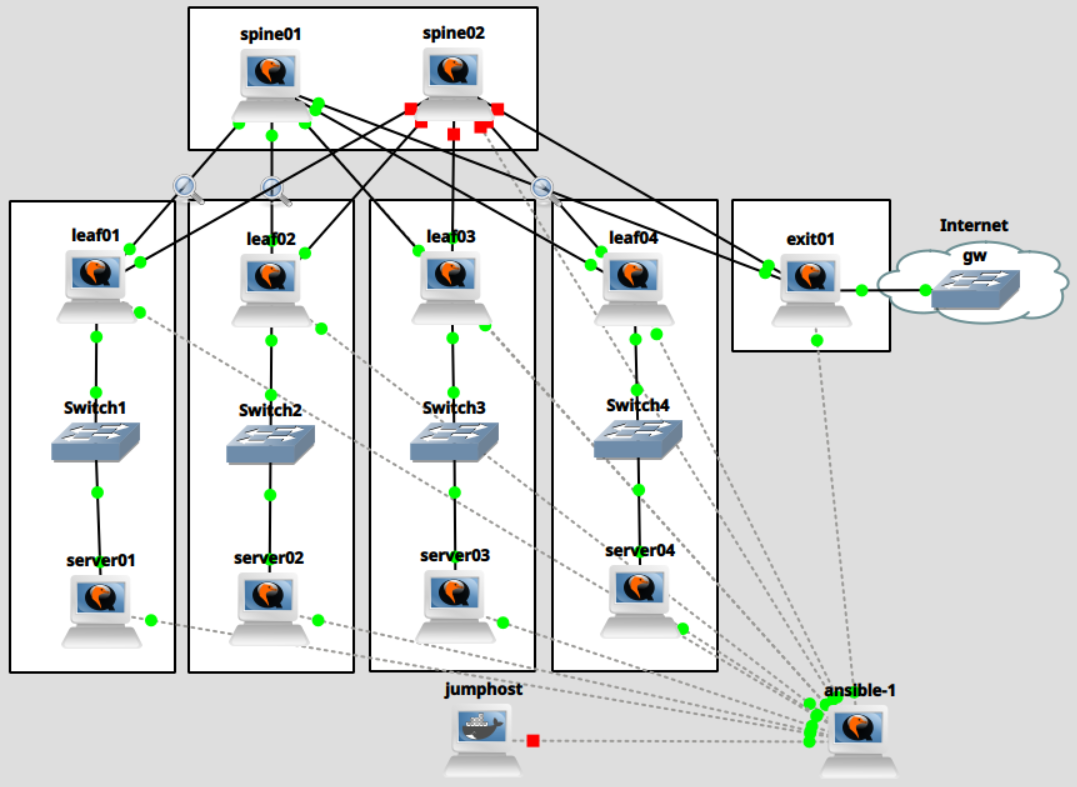
We run packet captures on the following links:
server01 <-> leaf01leaf01 <-> spine01server02 <-> leaf02leaf02 <-> spine01exit01 <-> spine01
Server to server traffic
First, we ping from server01 to server02 on VLAN 100. We then sleep for 5 seconds, flush the ARP table, and
repeat the same step again.
| [root@server01 ~]# ip neigh flush dev vlan100
[root@server01 ~]# ping -c1 -W1 172.16.100.102
[root@server01 ~]# sleep 5
[root@server01 ~]# ip neigh flush dev vlan100
[root@server01 ~]# ping -c1 -W1 172.16.100.102
|
As expected, we see the usual dance of ARP request and reply, followed by an Echo request and reply.
| $ tshark -ta -r switch1-leaf01.pcapng "frame.number >= 154 and frame.number <=157"
154 11:01:23.217037 0c:ba:53:a9:00:00 → ff:ff:ff:ff:ff:ff 0c:ba:53:a9:00:00 Broadcast ARP 46 Who has 172.16.100.102? Tell 172.16.100.101
155 11:01:23.218893 0c:fc:ff:4c:00:00 → 0c:ba:53:a9:00:00 0c:fc:ff:4c:00:00 0c:ba:53:a9:00:00 ARP 46 172.16.100.102 is at 0c:fc:ff:4c:00:00
156 11:01:23.219078 0c:ba:53:a9:00:00 → 0c:fc:ff:4c:00:00 172.16.100.101 172.16.100.102 ICMP 102 Echo (ping) request id=0x0001, seq=1/256, ttl=64
157 11:01:23.220940 0c:fc:ff:4c:00:00 → 0c:ba:53:a9:00:00 172.16.100.102 172.16.100.101 ICMP 102 Echo (ping) reply id=0x0001, seq=1/256, ttl=64 (request in 156)
$ tshark -ta -r switch1-leaf01.pcapng "frame.number >= 161 and frame.number <=164"
161 11:01:28.233477 0c:ba:53:a9:00:00 → ff:ff:ff:ff:ff:ff 0c:ba:53:a9:00:00 Broadcast ARP 46 Who has 172.16.100.102? Tell 172.16.100.101
162 11:01:28.236794 0c:fc:ff:4c:00:00 → 0c:ba:53:a9:00:00 0c:fc:ff:4c:00:00 0c:ba:53:a9:00:00 ARP 46 172.16.100.102 is at 0c:fc:ff:4c:00:00
163 11:01:28.237114 0c:ba:53:a9:00:00 → 0c:fc:ff:4c:00:00 172.16.100.101 172.16.100.102 ICMP 102 Echo (ping) request id=0x0002, seq=1/256, ttl=64
164 11:01:28.239746 0c:fc:ff:4c:00:00 → 0c:ba:53:a9:00:00 172.16.100.102 172.16.100.101 ICMP 102 Echo (ping) reply id=0x0002, seq=1/256, ttl=64 (request in 163)
|
The interesting details can be observed on the link between leaf01 and spine01.
 1
 2
 3
 4
 5
 6
 7
 8
 9
10
11
12 | $ tshark -ta -r leaf01-spine01.pcapng "frame.number >= 192 and frame.number <=202"
192 11:01:23.217550 0c:ba:53:a9:00:00 → ff:ff:ff:ff:ff:ff 0c:ba:53:a9:00:00 37529 Broadcast 4789 ARP 92 Who has 172.16.100.102? Tell 172.16.100.101
193 11:01:23.217585 0c:ba:53:a9:00:00 → ff:ff:ff:ff:ff:ff 0c:ba:53:a9:00:00 37529 Broadcast 4789 ARP 92 Who has 172.16.100.102? Tell 172.16.100.101
194 11:01:23.218656 0c:fc:ff:4c:00:00 → 0c:ba:53:a9:00:00 0c:fc:ff:4c:00:00 50183 0c:ba:53:a9:00:00 4789 ARP 92 172.16.100.102 is at 0c:fc:ff:4c:00:00
195 11:01:23.219282 0c:ba:53:a9:00:00 → 0c:fc:ff:4c:00:00 172.16.100.101 59193 172.16.100.102 4789 ICMP 148 Echo (ping) request id=0x0001, seq=1/256, ttl=64
196 11:01:23.219298 0c:ba:53:a9:00:00 → 0c:fc:ff:4c:00:00 172.16.100.101 59193 172.16.100.102 4789 ICMP 148 Echo (ping) request id=0x0001, seq=1/256, ttl=64
197 11:01:23.220648 0c:fc:ff:4c:00:00 → 0c:ba:53:a9:00:00 172.16.100.102 50216 172.16.100.101 4789 ICMP 148 Echo (ping) reply id=0x0001, seq=1/256, ttl=64 (request in 196)
198 11:01:23.267905 0c:ca:bf:21:00:00 → 0c:7e:b5:f6:00:01 fe80::eca:bfff:fe21:0 179 fe80::e7e:b5ff:fef6:1 58656 BGP 190 UPDATE Message
(...)
200 11:01:23.319325 0c:7e:b5:f6:00:01 → 0c:ca:bf:21:00:00 fe80::e7e:b5ff:fef6:1 58656 fe80::eca:bfff:fe21:0 179 BGP 302 UPDATE Message, UPDATE Message
(...)
202 11:01:23.370553 0c:ca:bf:21:00:00 → 0c:7e:b5:f6:00:01 fe80::eca:bfff:fe21:0 179 fe80::e7e:b5ff:fef6:1 58656 BGP 198 UPDATE Message
|
We can see that each ARP request is duplicated. This is to be expected - the ARP requests are broadcast, and are thus transmitted to
each known tunnel endpoint:
| $ tshark -ta -r leaf01-spine01.pcapng -O "" "frame.number == 192" | grep Dst
Ethernet II, Src: 0c:ca:bf:21:00:00 (0c:ca:bf:21:00:00), Dst: 0c:7e:b5:f6:00:01 (0c:7e:b5:f6:00:01)
Internet Protocol Version 4, Src: 10.0.0.101, Dst: 10.0.0.102
User Datagram Protocol, Src Port: 37529, Dst Port: 4789
Ethernet II, Src: 0c:ba:53:a9:00:00 (0c:ba:53:a9:00:00), Dst: Broadcast (ff:ff:ff:ff:ff:ff)
[akaris@workstation blog (master)]$ tshark -ta -r leaf01-spine01.pcapng -O "" "frame.number == 193" | grep Dst
Ethernet II, Src: 0c:ca:bf:21:00:00 (0c:ca:bf:21:00:00), Dst: 0c:7e:b5:f6:00:01 (0c:7e:b5:f6:00:01)
Internet Protocol Version 4, Src: 10.0.0.101, Dst: 10.0.0.250
User Datagram Protocol, Src Port: 37529, Dst Port: 4789
Ethernet II, Src: 0c:ba:53:a9:00:00 (0c:ba:53:a9:00:00), Dst: Broadcast (ff:ff:ff:ff:ff:ff)
|
As shown in a previous section, leaf01's fdb is populated with the tunnel endpoints for broadcast messages:
| [root@leaf01 ~]# bridge fdb ls dev vxlan100
0c:f2:c4:f5:00:02 vlan 1 extern_learn master br100
0c:f2:c4:f5:00:02 extern_learn master br100
86:c6:be:8d:a0:1c vlan 1 master br100 permanent
86:c6:be:8d:a0:1c master br100 permanent
00:00:00:00:00:00 dst 10.0.0.250 self permanent
00:00:00:00:00:00 dst 10.0.0.102 self permanent
0c:f2:c4:f5:00:02 dst 10.0.0.250 self extern_learn
|
We then receive an ARP reply from server02, and the single Echo request from server01 is again duplicated and
sent out to both tunnel endpoints.
1
2
3
4
5
6
7
8
9
10
11
12 | $ tshark -ta -r leaf01-spine01.pcapng -O "" "frame.number == 195" | grep Dst
Ethernet II, Src: 0c:ca:bf:21:00:00 (0c:ca:bf:21:00:00), Dst: 0c:7e:b5:f6:00:01 (0c:7e:b5:f6:00:01)
Internet Protocol Version 4, Src: 10.0.0.101, Dst: 10.0.0.102
User Datagram Protocol, Src Port: 59193, Dst Port: 4789
Ethernet II, Src: 0c:ba:53:a9:00:00 (0c:ba:53:a9:00:00), Dst: 0c:fc:ff:4c:00:00 (0c:fc:ff:4c:00:00)
Internet Protocol Version 4, Src: 172.16.100.101, Dst: 172.16.100.102
$ tshark -ta -r leaf01-spine01.pcapng -O "" "frame.number == 196" | grep Dst
Ethernet II, Src: 0c:ca:bf:21:00:00 (0c:ca:bf:21:00:00), Dst: 0c:7e:b5:f6:00:01 (0c:7e:b5:f6:00:01)
Internet Protocol Version 4, Src: 10.0.0.101, Dst: 10.0.0.250
User Datagram Protocol, Src Port: 59193, Dst Port: 4789
Ethernet II, Src: 0c:ba:53:a9:00:00 (0c:ba:53:a9:00:00), Dst: 0c:fc:ff:4c:00:00 (0c:fc:ff:4c:00:00)
Internet Protocol Version 4, Src: 172.16.100.101, Dst: 172.16.100.102
|
leaf01 then receives a single ping reply from server02 via leaf02 (packet 197).
Remember that we disabled learning for the VXLAN interface. If learning were enabled, the kernel could enter
the MAC address of server02 into the forwarding table at this stage. However, we delegate this task to EVPN.
In the BGP UPDATE message (frame 198) from leaf01 to spine01, we see how leaf01 notifies the rest of
the network with a MAC Advertisement Route (type 2) of the MAC address of server01 (0c:ba:53:a9:00:00).
1
2
3
4
5
6
7
8
9
10
11
12
13
14
15
16
17
18
19
20
21
22
23
24
25
26
27 | $ tshark -ta -r leaf01-spine01.pcapng -O "bgp" "frame.number == 198"
Frame 198: Packet, 190 bytes on wire (1520 bits), 190 bytes captured (1520 bits) on interface -, id 0
Ethernet II, Src: 0c:ca:bf:21:00:00 (0c:ca:bf:21:00:00), Dst: 0c:7e:b5:f6:00:01 (0c:7e:b5:f6:00:01)
Internet Protocol Version 6, Src: fe80::eca:bfff:fe21:0, Dst: fe80::e7e:b5ff:fef6:1
Transmission Control Protocol, Src Port: 179, Dst Port: 58656, Seq: 932, Ack: 932, Len: 104
Border Gateway Protocol - UPDATE Message
(...)
Path attributes
Network Layer Reachability Information (NLRI)
EVPN NLRI: MAC Advertisement Route
Route Type: MAC Advertisement Route (2)
Length: 33
Route Distinguisher: 00010a0000650002 (10.0.0.101:2)
ESI: 00:00:00:00:00:00:00:00:00:00
ESI Type: ESI 9 bytes value (0)
ESI Value: 00 00 00 00 00 00 00 00 00
ESI 9 bytes value: 00 00 00 00 00 00 00 00 00
Ethernet Tag ID: 0
MAC Address Length: 48
MAC Address: 0c:ba:53:a9:00:00 (0c:ba:53:a9:00:00)
IP Address Length: 0
IP Address: NOT INCLUDED
[Expert Info (Note/Protocol): IP Address: NOT INCLUDED]
[IP Address: NOT INCLUDED]
[Severity level: Note]
[Group: Protocol]
VNI: 100
|
In the BGP UPDATE message (frame 200) from spine01 to leaf01, we see how leaf01 is made aware of
the MAC address of server02 (0c:fc:ff:4c:00:00) via a MAC Advertisement Route (type 2)
1
2
3
4
5
6
7
8
9
10
11
12
13
14
15
16
17
18
19
20
21
22
23
24
25
26
27
28
29
30 | $ tshark -ta -r leaf01-spine01.pcapng -O "bgp" "frame.number == 200"
Frame 200: Packet, 302 bytes on wire (2416 bits), 302 bytes captured (2416 bits) on interface -, id 0
Ethernet II, Src: 0c:7e:b5:f6:00:01 (0c:7e:b5:f6:00:01), Dst: 0c:ca:bf:21:00:00 (0c:ca:bf:21:00:00)
Internet Protocol Version 6, Src: fe80::e7e:b5ff:fef6:1, Dst: fe80::eca:bfff:fe21:0
Transmission Control Protocol, Src Port: 58656, Dst Port: 179, Seq: 932, Ack: 1036, Len: 216
(...)
Border Gateway Protocol - UPDATE Message
(...)
Path attributes
(...)
Network Layer Reachability Information (NLRI)
EVPN NLRI: MAC Advertisement Route
Route Type: MAC Advertisement Route (2)
Length: 33
Route Distinguisher: 00010a0000660002 (10.0.0.102:2)
ESI: 00:00:00:00:00:00:00:00:00:00
ESI Type: ESI 9 bytes value (0)
ESI Value: 00 00 00 00 00 00 00 00 00
ESI 9 bytes value: 00 00 00 00 00 00 00 00 00
Ethernet Tag ID: 0
MAC Address Length: 48
MAC Address: 0c:fc:ff:4c:00:00 (0c:fc:ff:4c:00:00)
IP Address Length: 0
IP Address: NOT INCLUDED
[Expert Info (Note/Protocol): IP Address: NOT INCLUDED]
[IP Address: NOT INCLUDED]
[Severity level: Note]
[Group: Protocol]
VNI: 100
(...)
|
Upon generation/receipt of these message, FRR can populate the MAC table for vni 100.
| [root@leaf01 ~]# vtysh -c "show evpn mac vni 100"
Number of MACs (local and remote) known for this VNI: 3
Flags: N=sync-neighs, I=local-inactive, P=peer-active, X=peer-proxy
MAC Type Flags Intf/Remote ES/VTEP VLAN Seq #'s
0c:fc:ff:4c:00:00 remote 10.0.0.102 0/0
0c:f2:c4:f5:00:02 remote 10.0.0.250 0/0
0c:ba:53:a9:00:00 local vlan100 0/0
|
The MAC table is populated from the BGP EVPN routes.
 1
 2
 3
 4
 5
 6
 7
 8
 9
10
11
12
13
14
15
16
17
18
19
20
21
22
23
24
25
26
27
28
29
30
31
32
33
34
35
36
37
38
39
40
41
42 | [root@leaf01 ~]# vtysh -c "show bgp evpn route"
BGP table version is 4, local router ID is 10.0.0.101
Status codes: s suppressed, d damped, h history, * valid, > best, i - internal
Origin codes: i - IGP, e - EGP, ? - incomplete
EVPN type-1 prefix: [1]:[EthTag]:[ESI]:[IPlen]:[VTEP-IP]:[Frag-id]
EVPN type-2 prefix: [2]:[EthTag]:[MAClen]:[MAC]:[IPlen]:[IP]
EVPN type-3 prefix: [3]:[EthTag]:[IPlen]:[OrigIP]
EVPN type-4 prefix: [4]:[ESI]:[IPlen]:[OrigIP]
EVPN type-5 prefix: [5]:[EthTag]:[IPlen]:[IP]
Network Next Hop Metric LocPrf Weight Path
Extended Community
Route Distinguisher: 10.0.0.101:2
*> [2]:[0]:[48]:[0c:ba:53:a9:00:00]
10.0.0.101 32768 i
ET:8 RT:65101:100
(...)
Route Distinguisher: 10.0.0.102:2
*> [2]:[0]:[48]:[0c:fc:ff:4c:00:00]
10.0.0.102 0 65200 65102 i
RT:65102:100 ET:8
(...)
Route Distinguisher: 10.0.0.250:2
*> [2]:[0]:[48]:[0c:f2:c4:f5:00:02]:[32]:[172.16.103.1]
10.0.0.250 0 65200 65250 i
RT:65250:103 ET:8 Default Gateway
(...)
Route Distinguisher: 10.0.0.250:3
*> [2]:[0]:[48]:[0c:f2:c4:f5:00:02]:[32]:[172.16.100.1]
10.0.0.250 0 65200 65250 i
RT:65250:100 ET:8 Default Gateway
(...)
Route Distinguisher: 10.0.0.250:4
*> [2]:[0]:[48]:[0c:f2:c4:f5:00:02]:[32]:[172.16.102.1]
10.0.0.250 0 65200 65250 i
RT:65250:102 ET:8 Default Gateway
(...)
Route Distinguisher: 10.0.0.250:5
*> [2]:[0]:[48]:[0c:f2:c4:f5:00:02]:[32]:[172.16.101.1]
10.0.0.250 0 65200 65250 i
RT:65250:101 ET:8 Default Gateway
(...)
|
FRR updates leaf01's forwarding table with instructions to forward frames destined for server02 (0c:fc:ff:4c:00:00)
to tunnel endpoint 10.0.0.102 (leaf02).
| [root@leaf01 ~]# bridge fdb ls dev vxlan100
0c:fc:ff:4c:00:00 vlan 1 extern_learn master br100
0c:fc:ff:4c:00:00 extern_learn master br100
0c:f2:c4:f5:00:02 vlan 1 extern_learn master br100
0c:f2:c4:f5:00:02 extern_learn master br100
86:c6:be:8d:a0:1c vlan 1 master br100 permanent
86:c6:be:8d:a0:1c master br100 permanent
0c:fc:ff:4c:00:00 dst 10.0.0.102 self extern_learn
00:00:00:00:00:00 dst 10.0.0.250 self permanent
00:00:00:00:00:00 dst 10.0.0.102 self permanent
0c:f2:c4:f5:00:02 dst 10.0.0.250 self extern_learn
|
The second ARP request is again sent out to both peers - we expect this as this ARP request is destined to the
broadcast address.
However, because leaf01 now knows how to reach frames with a unicast destination of server02, the next time
server01 sends a unicast Echo request to server02, it is only sent once, to leaf02 (10.0.0.102):
| $ tshark -ta -r leaf01-spine01.pcapng "frame.number >= 208 and frame.number <=212"
208 11:01:28.233997 0c:ba:53:a9:00:00 → ff:ff:ff:ff:ff:ff 0c:ba:53:a9:00:00 37529 Broadcast 4789 ARP 92 Who has 172.16.100.102? Tell 172.16.100.101
209 11:01:28.234069 0c:ba:53:a9:00:00 → ff:ff:ff:ff:ff:ff 0c:ba:53:a9:00:00 37529 Broadcast 4789 ARP 92 Who has 172.16.100.102? Tell 172.16.100.101
210 11:01:28.236402 0c:fc:ff:4c:00:00 → 0c:ba:53:a9:00:00 0c:fc:ff:4c:00:00 50183 0c:ba:53:a9:00:00 4789 ARP 92 172.16.100.102 is at 0c:fc:ff:4c:00:00
211 11:01:28.237455 0c:ba:53:a9:00:00 → 0c:fc:ff:4c:00:00 172.16.100.101 59193 172.16.100.102 4789 ICMP 148 Echo (ping) request id=0x0002, seq=1/256, ttl=64
212 11:01:28.239178 0c:fc:ff:4c:00:00 → 0c:ba:53:a9:00:00 172.16.100.102 50216 172.16.100.101 4789 ICMP 148 Echo (ping) reply id=0x0002, seq=1/256, ttl=64 (request in 211)
|
| $ tshark -ta -r leaf01-spine01.pcapng -O "bgp" "frame.number == 211"
Frame 211: Packet, 148 bytes on wire (1184 bits), 148 bytes captured (1184 bits) on interface -, id 0
Ethernet II, Src: 0c:ca:bf:21:00:00 (0c:ca:bf:21:00:00), Dst: 0c:7e:b5:f6:00:01 (0c:7e:b5:f6:00:01)
Internet Protocol Version 4, Src: 10.0.0.101, Dst: 10.0.0.102
User Datagram Protocol, Src Port: 59193, Dst Port: 4789
Virtual eXtensible Local Area Network
Ethernet II, Src: 0c:ba:53:a9:00:00 (0c:ba:53:a9:00:00), Dst: 0c:fc:ff:4c:00:00 (0c:fc:ff:4c:00:00)
Internet Protocol Version 4, Src: 172.16.100.101, Dst: 172.16.100.102
Internet Control Message Protocol
|
Server to router traffic
Next, we ping from server01 to exit01 on VLAN 101. We then sleep for 5 seconds, flush the ARP table, and
repeat the same step again.
| [root@server01 ~]# ip neigh flush dev vlan101
[root@server01 ~]# ping -c1 -W1 172.16.101.1
[root@server01 ~]# sleep 5
[root@server01 ~]# ip neigh flush dev vlan101
[root@server01 ~]# ping -c1 -W1 172.16.101.1
|
In this section, we only focus on the differences compared to our previous example. Node exit01 is not aware
of the location of server01. It therefore relies on the same mechanisms explained previously. However, we have already
seen that the EVPN is aware of exit01's MAC and IP address even without exchanging a single packet via the overlay
tunnels.
The packet capture between server01 and leaf01 looks mostly as expected. The exit01 node sends an extra ARP request,
trying to resolve server01 (172.16.101.101). We will address this shortly.
| $ tshark -ta -r switch1-leaf01-exit.pcapng.png.pcapng "frame.number >= 3704 and frame.number <= 3709"
tshark: The file "switch1-leaf01-exit.pcapng.png.pcapng" doesn't exist.
[akaris@workstation blog (master)]$ tshark -ta -r switch1-leaf01-exit.pcapng "frame.number >= 3704 and frame.number <= 3709"
3704 12:00:13.048847 0c:ba:53:a9:00:00 → ff:ff:ff:ff:ff:ff 0c:ba:53:a9:00:00 Broadcast ARP 46 Who has 172.16.101.1? Tell 172.16.101.101
3705 12:00:13.049085 0c:f2:c4:f5:00:02 → 0c:ba:53:a9:00:00 0c:f2:c4:f5:00:02 0c:ba:53:a9:00:00 ARP 46 172.16.101.1 is at 0c:f2:c4:f5:00:02
3706 12:00:13.049320 0c:ba:53:a9:00:00 → 0c:f2:c4:f5:00:02 172.16.101.101 172.16.101.1 ICMP 102 Echo (ping) request id=0x0004, seq=1/256, ttl=64
3707 12:00:13.051471 0c:f2:c4:f5:00:02 → ff:ff:ff:ff:ff:ff 0c:f2:c4:f5:00:02 Broadcast ARP 46 Who has 172.16.101.101? Tell 172.16.101.1
3708 12:00:13.051867 0c:ba:53:a9:00:00 → 0c:f2:c4:f5:00:02 0c:ba:53:a9:00:00 0c:f2:c4:f5:00:02 ARP 46 172.16.101.101 is at 0c:ba:53:a9:00:00
3709 12:00:13.053414 0c:f2:c4:f5:00:02 → 0c:ba:53:a9:00:00 172.16.101.1 172.16.101.101 ICMP 102 Echo (ping) reply id=0x0004, seq=1/256, ttl=64 (request in 3706)
|
The interesting stuff again happens on the link between leaf01 and spine01. leaf01 does not forward the ARP
request from server01 to exit01 via the tunnel.
| $ tshark -ta -r leaf01-spine01-exit.pcapng "frame.number >= 4674 and frame.number <= 4677"
4674 12:00:13.049608 0c:ba:53:a9:00:00 → 0c:f2:c4:f5:00:02 172.16.101.101 38599 172.16.101.1 4789 ICMP 148 Echo (ping) request id=0x0004, seq=1/256, ttl=64
4675 12:00:13.050830 0c:f2:c4:f5:00:02 → ff:ff:ff:ff:ff:ff 0c:f2:c4:f5:00:02 38577 Broadcast 4789 ARP 92 Who has 172.16.101.101? Tell 172.16.101.1
4676 12:00:13.052134 0c:ba:53:a9:00:00 → 0c:f2:c4:f5:00:02 0c:ba:53:a9:00:00 37529 0c:f2:c4:f5:00:02 4789 ARP 92 172.16.101.101 is at 0c:ba:53:a9:00:00
4677 12:00:13.052989 0c:f2:c4:f5:00:02 → 0c:ba:53:a9:00:00 172.16.101.1 57096 172.16.101.101 4789 ICMP 148 Echo (ping) reply id=0x0004, seq=1/256, ttl=64 (request in 4674)
|
Remember that we configured ARP proxy and suppression on the VXLAN, and that FRR populated the fdb and the neighbor
table already with the data of exit01 (172.16.101.1, 0c:f2:c4:f5:00:02).
 1
 2
 3
 4
 5
 6
 7
 8
 9
10
11
12
13
14
15
16
17
18
19
20
21
22
23
24
25
26
27
28
29
30
31
32
33
34
35
36
37 | [root@leaf01 ~]# vtysh -c "show evpn mac vni 101"
Number of MACs (local and remote) known for this VNI: 1
Flags: N=sync-neighs, I=local-inactive, P=peer-active, X=peer-proxy
MAC Type Flags Intf/Remote ES/VTEP VLAN Seq #'s
0c:f2:c4:f5:00:02 remote 10.0.0.250 0/0
[root@leaf01 ~]# vtysh -c "show bgp evpn route"
(...)
Route Distinguisher: 10.0.0.250:2
*> [2]:[0]:[48]:[0c:f2:c4:f5:00:02]:[32]:[172.16.103.1]
10.0.0.250 0 65200 65250 i
RT:65250:103 ET:8 Default Gateway
(...)
Route Distinguisher: 10.0.0.250:3
*> [2]:[0]:[48]:[0c:f2:c4:f5:00:02]:[32]:[172.16.100.1]
10.0.0.250 0 65200 65250 i
RT:65250:100 ET:8 Default Gateway
(...)
Route Distinguisher: 10.0.0.250:4
*> [2]:[0]:[48]:[0c:f2:c4:f5:00:02]:[32]:[172.16.102.1]
10.0.0.250 0 65200 65250 i
RT:65250:102 ET:8 Default Gateway
(...)
Route Distinguisher: 10.0.0.250:5
*> [2]:[0]:[48]:[0c:f2:c4:f5:00:02]:[32]:[172.16.101.1]
10.0.0.250 0 65200 65250 i
RT:65250:101 ET:8 Default Gateway
(...)
[root@leaf01 ~]# bridge fdb ls dev vxlan101
0c:f2:c4:f5:00:02 vlan 1 extern_learn master br101
0c:f2:c4:f5:00:02 extern_learn master br101
ae:53:dc:b0:b8:87 vlan 1 master br101 permanent
ae:53:dc:b0:b8:87 master br101 permanent
00:00:00:00:00:00 dst 10.0.0.250 self permanent
00:00:00:00:00:00 dst 10.0.0.102 self permanent
0c:f2:c4:f5:00:02 dst 10.0.0.250 self extern_learn
[root@leaf01 ~]# ip neigh ls dev br101
172.16.101.1 lladdr 0c:f2:c4:f5:00:02 extern_learn NOARP proto zebra
|
This also explains why exit01 now sends an ARP request for server01 - it never received server01's ARP
request and therefore must perform ARP resolution.
The second time, this does not occur. server01 queries for exit01's MAC address, and leaf01 responds
as a proxy.
| $ tshark -ta -r switch1-leaf01-exit.pcapng "frame.number >= 3716 and frame.number <= 3719"
3716 12:00:18.064964 0c:ba:53:a9:00:00 → ff:ff:ff:ff:ff:ff 0c:ba:53:a9:00:00 Broadcast ARP 46 Who has 172.16.101.1? Tell 172.16.101.101
3717 12:00:18.065377 0c:f2:c4:f5:00:02 → 0c:ba:53:a9:00:00 0c:f2:c4:f5:00:02 0c:ba:53:a9:00:00 ARP 46 172.16.101.1 is at 0c:f2:c4:f5:00:02
3718 12:00:18.065815 0c:ba:53:a9:00:00 → 0c:f2:c4:f5:00:02 172.16.101.101 172.16.101.1 ICMP 102 Echo (ping) request id=0x0005, seq=1/256, ttl=64
3719 12:00:18.066828 0c:f2:c4:f5:00:02 → 0c:ba:53:a9:00:00 172.16.101.1 172.16.101.101 ICMP 102 Echo (ping) reply id=0x0005, seq=1/256, ttl=64 (request in 3718)
|
No ARP messages are exchanged via the tunnel because exit01 still has a neighbor entry for server01.
| $ tshark -ta -r leaf01-spine01-exit.pcapng "frame.number >= 4690 and frame.number <= 4691"
4690 12:00:18.065967 0c:ba:53:a9:00:00 → 0c:f2:c4:f5:00:02 172.16.101.101 38599 172.16.101.1 4789 ICMP 148 Echo (ping) request id=0x0005, seq=1/256, ttl=64
4691 12:00:18.066669 0c:f2:c4:f5:00:02 → 0c:ba:53:a9:00:00 172.16.101.1 57096 172.16.101.101 4789 ICMP 148 Echo (ping) reply id=0x0005, seq=1/256, ttl=64 (request in 4690)
|