EVPN in the Datacenter: Part 1 - Datacenter Routing
Introduction
In this series of blog posts, I will explore the setup of BGP as the routing protocol for a small, simulated datacenter, and discuss ways to configure EVPN on top of it.
I highly recommend Dinesh G. Dutt's books, BGP in the Data Center and EVPN in the Data Center, which form the basis for this series. The first book, BGP in the Data Center, can easily be replicated in a GNS3 lab. It does an amazing job at explaining
modern datacenter concepts and walks the reader through the setup of a simple two-tier Clos network.
I found that the second book, EVPN in the Data Center, does a good job of explaining the concepts. However,
some configurations differ with modern versions of FRR, making implementation a bit more challenging
(requiring trial and error to determine the correct setups).
Lab setup
The lab setup uses GNS3 with Fedora 43 virtual machines, each pre-installed with FRR. For simplicity, each VM has 8 NICs.
The 8th NIC of each VM serves as a management interface. To set up the VMs, I use Ansible, which I run from a management VM with Ansible and radvd pre-installed and with 16 interfaces. To access the environment, I use a jump host set up as a container with the nicolaka/netshoot Docker image.
For simplicity, we have 2 spine nodes, and each rack has a single server connected to a single leaf or ToR node
(because this is a two-tier Clos network, I use the 2 terms interchangeably). There is also only a single exit node.
Each server is connected to a dumb GNS3 Ethernet switch which is connected to the single leaf node for the simulated
rack. Think of the Fedora leaf VM and the dumb GNS3 switch together as simulating a ToR switch.
The exit node simulates an internet connection by adding dummy addresses to its loopback interface and announcing
a default route to the network.
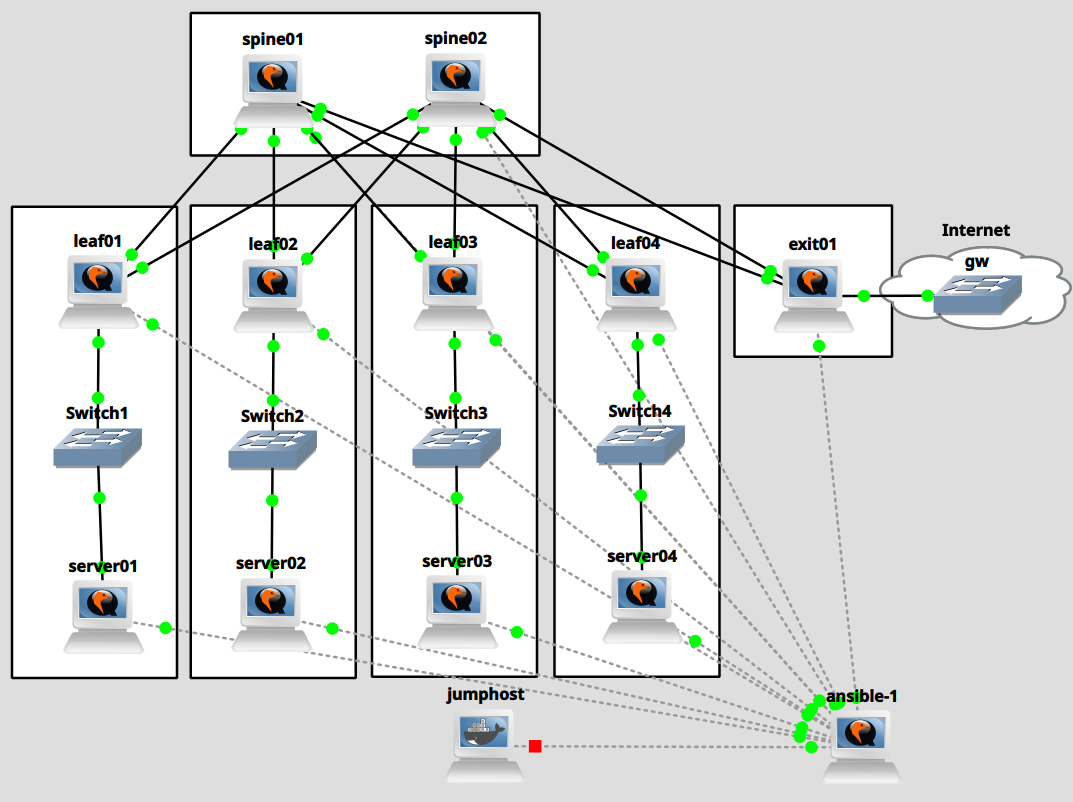
Connecting to the lab
While there are more elegant ways to connect to a GNS3 lab, I start by connecting to the jumphost container:
| $ docker ps
CONTAINER ID IMAGE COMMAND CREATED STATUS PORTS NAMES
2c1e9bc6b9c0 nicolaka/netshoot:latest "/gns3/init.sh sleep…" 9 minutes ago Up 5 minutes GNS3.jumphost.bb72c197-c299-4660-acaa-3ce3eb0a35d1
[akaris@workstation bgp-datacenter-evpn-topologies2 (master)]$ docker exec -it 2c1e9bc6b9c0 /bin/bash
jumphost:~#
|
I then add an IP address to the container.
| jumphost:~# ip a a 192.0.2.1/24 dev eth0
|
Then, via the GNS3 console, I configure the Ansible host and add 192.0.2.2/24 to the ens18 interface so that I can log in via the jumphost.
| # ip a a 192.0.2.2/24 dev ens18
|
| jumphost:~# ssh root@192.0.2.2
(...)
[root@optexternalGNS3imagesQEMUfedora43 ansible]# hostnamectl set-hostname ansible-1
[root@optexternalGNS3imagesQEMUfedora43 ansible]# bash
[root@ansible-1 ansible]# nmcli conn mod ens18 ipv4.address 192.0.2.2/24 ipv4.method static
[root@ansible-1 ansible]# nmcli conn up ens18
Connection successfully activated (D-Bus active path: /org/freedesktop/NetworkManager/ActiveConnection/315)
[root@ansible-1 ansible]#
|
Connecting the management node to all other systems
The Ansible host will send IPv6 router advertisements to the management interfaces of all other nodes. We therefore
configure all interfaces that connect the ansible machine to the rest of the hosts:
| [root@ansible-1 ansible]# systemctl restart NetworkManager
[root@ansible-1 ansible]# nmcli --terse --fields uuid,device conn show | awk -F ':' '/ens/ {print $1 " " $2}' | while read line; do id=$(echo $line | awk '{print $1}'); if=$(echo $line | awk '{print $2}'); nmcli conn mod $id connection.id $if; done
[root@ansible-1 ansible]# for i in {3..13}; do nmcli conn mod ens$i ipv6.method static ipv6.address 2000:0:0:$i::1/64 ipv4.method disabled; nmcli conn up ens$i; done
|
And then we set up router advertisements with radvd:
1
2
3
4
5
6
7
8
9
10
11
12
13
14
15
16
17
18 | > /etc/radvd.conf
for i in {3..13}; do cat <<EOF >> /etc/radvd.conf
interface ens$i
{
AdvSendAdvert on;
MinRtrAdvInterval 30;
MaxRtrAdvInterval 100;
prefix 2000:0:0:$i::/64
{
AdvOnLink on;
AdvAutonomous on;
AdvRouterAddr off;
};
};
EOF
done
systemctl enable --now radvd.service
|
By default, NetworkManager on Fedora attempts to auto-configure interfaces. Therefore, restart NetworkManager on the
managed nodes:
| $ systemctl restart NetworkManager
|
The managed nodes should now have IPv6 addresses, assigned via SLAAC, from the router advertisements originated by
the ansible host.
Next, I collect the IPv6 addresses of each host and add them to my Ansible hosts file:
1
2
3
4
5
6
7
8
9
10
11
12
13
14
15
16
17
18
19
20
21
22
23 | [root@ansible-1 ansible]# cat ansible.cfg
[defaults]
inventory=hosts
host_key_checking=False
[root@ansible-1 ansible]# cat hosts
[servers]
server01 ansible_host=2000::10:2f01:7b14:23e2:84c6 ansible_user=root
server02 ansible_host=2000::11:783a:eff2:775c:6dce ansible_user=root
server03 ansible_host=2000::12:b5f1:a3cc:7e43:254f ansible_user=root
server04 ansible_host=2000::13:be5c:62c1:9cee:a093 ansible_user=root
[leaves]
leaf01 ansible_host=2000::5:af9:ccef:1794:da8b ansible_user=root
leaf02 ansible_host=2000::6:b166:7dfb:b2b8:53fc ansible_user=root
leaf03 ansible_host=2000::7:2493:1050:ebe3:3da9 ansible_user=root
leaf04 ansible_host=2000::8:d80b:1594:edb5:8deb ansible_user=root
[spines]
spine01 ansible_host=2000::3:bc01:2558:b8f0:4ba7 ansible_user=root
spine02 ansible_host=2000::4:798c:2dc4:1fa9:435d ansible_user=root
[exits]
exit01 ansible_host=2000::9:7a4e:8756:c451:6674 ansible_user=root
|
Install ssh key to all hosts:
| [root@ansible-1 ansible]# ssh-keygen -f /root/.ssh/id_ed25519 -N ""
[root@ansible-1 ansible]# for host in $(awk '/ansible_host/ {print $2}' < hosts | sed 's/ansible_host=//'); do ssh-copy-id -i /root/.ssh/id_ed25519 $host; done
|
And make sure that ansible can connect:
| [root@ansible-1 ansible]# ansible -m ping all
|
Let's also add aliases to /etc/hosts:
| $ awk '/ansible_host/ {print $2 " " $1}' < hosts | sed 's/ansible_host=//' >> /etc/hosts
|
Configuring base networking on all nodes
So far, we only set up the management network. Now, we are going to configure the hostnames and networking for our
simulated datacenter. eBGP will handle the routing for us across link-local IPv6 interfaces, and eBGP will be set up
with unnumbered neighbors. Therefore, we start by configuring all interfaces (except the management interface)
with eui64 link-local addresses:
1
2
3
4
5
6
7
8
9
10
11
12
13
14
15
16
17
18 | $ mkdir templates
$ cat <<'EOF' > templates/setup-ipv6.j2
[connection]
id={{ interface }}
type=ethernet
interface-name={{ interface }}
[ethernet]
[ipv4]
method=disabled
[ipv6]
addr-gen-mode=eui64
method=link-local
[proxy]
EOF
|
 1
 2
 3
 4
 5
 6
 7
 8
 9
10
11
12
13
14
15
16
17
18
19
20
21
22
23
24
25
26
27
28
29
30 | $ cat <<'EOF' > initial-setup.yaml
---
- name: Initial setup
hosts: all
tasks:
- name: Set hostname
ansible.builtin.hostname:
name: "{{ inventory_hostname }}"
- name: Create Network Manager files
ansible.builtin.template:
src: templates/setup-ipv6.j2
dest: "/etc/NetworkManager/system-connections/{{ interface }}"
mode: 0600
loop: "{{ interfaces }}"
loop_control:
loop_var: interface
- name: Reload Network Manager
ansible.builtin.command:
cmd: systemctl restart NetworkManager
- name: Bring connections up
ansible.builtin.shell:
cmd: "nmcli conn up {{ interface }} || true"
loop: "{{ interfaces }}"
loop_control:
loop_var: interface
- name: Delete all inactive connections
ansible.builtin.shell:
cmd: "nmcli --terse --fields uuid,state conn show | grep -v activated | awk -F ':' '{print $1}' | xargs nmcli conn del || true"
EOF
|
ens10 is the management interface for each node. The interfaces to configure are ens3 through ens9:
1
2
3
4
5
6
7
8
9
10
11
12 | mkdir group_vars
cat <<'EOF'>group_vars/all.yml
---
interfaces:
- ens3
- ens4
- ens5
- ens6
- ens7
- ens8
- ens9
EOF
|
Run ansible-playbook:
| ansible-playbook initial-setup.yaml
|
Finally, we should see something like this on each node:
 1
 2
 3
 4
 5
 6
 7
 8
 9
10
11
12
13
14
15
16
17
18
19
20
21
22
23
24
25
26
27
28
29
30
31
32
33 | [root@spine01 ~]# nmcli con
NAME UUID TYPE DEVICE
Wired connection 1 a52e1cb9-ced0-399e-9661-66fdac302807 ethernet ens10
lo ac659531-c7ba-4796-a240-04ed2eefa132 loopback lo
ens4 173da572-91d5-38a3-ad9a-1ac1cd008359 ethernet ens4
ens5 47ea5368-393d-35dd-9645-a4540519e8c0 ethernet ens5
ens6 2a330497-84a4-35f2-b238-4e70367b03d4 ethernet ens6
ens7 93f48626-6942-3555-b3d1-e9ab6d91bbed ethernet ens7
ens8 58887f71-d972-3890-b7f5-98c8356841fd ethernet ens8
[root@spine01 ~]# ip -6 a
1: lo: <LOOPBACK,UP,LOWER_UP> mtu 65536 state UNKNOWN qlen 1000
inet6 ::1/128 scope host noprefixroute
valid_lft forever preferred_lft forever
3: ens4: <BROADCAST,MULTICAST,UP,LOWER_UP> mtu 1500 state UP qlen 1000
inet6 fe80::e7e:b5ff:fef6:1/64 scope link noprefixroute
valid_lft forever preferred_lft forever
4: ens5: <BROADCAST,MULTICAST,UP,LOWER_UP> mtu 1500 state UP qlen 1000
inet6 fe80::e7e:b5ff:fef6:2/64 scope link noprefixroute
valid_lft forever preferred_lft forever
5: ens6: <BROADCAST,MULTICAST,UP,LOWER_UP> mtu 1500 state UP qlen 1000
inet6 fe80::e7e:b5ff:fef6:3/64 scope link noprefixroute
valid_lft forever preferred_lft forever
6: ens7: <BROADCAST,MULTICAST,UP,LOWER_UP> mtu 1500 state UP qlen 1000
inet6 fe80::e7e:b5ff:fef6:4/64 scope link noprefixroute
valid_lft forever preferred_lft forever
7: ens8: <BROADCAST,MULTICAST,UP,LOWER_UP> mtu 1500 state UP qlen 1000
inet6 fe80::e7e:b5ff:fef6:5/64 scope link noprefixroute
valid_lft forever preferred_lft forever
9: ens10: <BROADCAST,MULTICAST,UP,LOWER_UP> mtu 1500 state UP qlen 1000
inet6 2000::3:bc01:2558:b8f0:4ba7/64 scope global dynamic noprefixroute
valid_lft 86343sec preferred_lft 14343sec
inet6 fe80::ef9b:8162:16c5:3bae/64 scope link noprefixroute
valid_lft forever preferred_lft forever
|
Configuring the spine nodes
The spine nodes have the simplest configuration out of all nodes. We need to add IPv4 loopback addresses and set up
FRR:
1
2
3
4
5
6
7
8
9
10
11
12
13
14
15
16
17
18
19
20
21
22
23
24
25
26
27
28 | cat <<'EOF' > setup-spine.yaml
---
- name: Spine setup
hosts: spines
tasks:
- name: Set up loopback interface
ansible.builtin.command:
cmd: "nmcli conn mod lo ipv4.address {{ loopback_address }}"
- name: Enable IPv4 forwarding
ansible.posix.sysctl:
name: net.ipv4.ip_forward
value: 1
state: present
- name: Copy FRR damones configurations
ansible.builtin.copy:
src: templates/daemons
dest: /etc/frr/daemons
- name: Copy FRR configuration
ansible.builtin.template:
src: templates/setup-spine-frr.j2
dest: /etc/frr/frr.conf
- name: Enable and restart FRR
ansible.builtin.service:
name: frr
enabled: true
state: restarted
EOF
|
Configure FRR daemons via the daemons file:
 1
 2
 3
 4
 5
 6
 7
 8
 9
10
11
12
13
14
15
16
17
18
19
20
21
22
23
24
25
26
27
28
29
30
31
32
33
34
35
36
37
38 | cat <<'EOF' > templates/daemons
bgpd=yes
ospfd=no
ospf6d=no
ripd=no
ripngd=no
isisd=no
pimd=no
pim6d=no
nhrpd=no
eigrpd=no
sharpd=no
pbrd=no
bfdd=no
fabricd=no
vrrpd=no
pathd=no
vtysh_enable=yes
zebra_options=" -A 127.0.0.1 -s 90000000"
mgmtd_options=" -A 127.0.0.1"
bgpd_options=" -A 127.0.0.1"
ospfd_options=" -A 127.0.0.1"
ospf6d_options=" -A ::1"
ripd_options=" -A 127.0.0.1"
ripngd_options=" -A ::1"
isisd_options=" -A 127.0.0.1"
pimd_options=" -A 127.0.0.1"
pim6d_options=" -A ::1"
nhrpd_options=" -A 127.0.0.1"
eigrpd_options=" -A 127.0.0.1"
sharpd_options=" -A 127.0.0.1"
pbrd_options=" -A 127.0.0.1"
staticd_options="-A 127.0.0.1"
bfdd_options=" -A 127.0.0.1"
fabricd_options="-A 127.0.0.1"
vrrpd_options=" -A 127.0.0.1"
pathd_options=" -A 127.0.0.1"
EOF
|
FRR's BGP sets up unnumbered BGP peers with the following settings:
neighbor PEER remote-as external - "Create a peer as you would when you specify an ASN, except that if the peers
ASN is the same as mine as specified under the router bgp ASN command the connection will be
denied." https://docs.frrouting.org/en/latest/bgp.htmlneighbor PEER interface [peer-group NAME] - "Configure an unnumbered BGP peer. PEER should be an interface name.
The session will be established via IPv6 link locals." https://docs.frrouting.org/en/latest/bgp.html
In addition, we set:
We redistribute connected routes, but only those that match the list of permitted subnets (see below). We also tune some of the
BGP timers to speed up convergence. See the aforementioned books for the reasons behind choosing these timers.
 1
 2
 3
 4
 5
 6
 7
 8
 9
10
11
12
13
14
15
16
17
18
19
20
21
22
23
24
25
26
27
28
29
30
31
32
33 | cat <<'EOF' > templates/setup-spine-frr.j2
frr defaults traditional
hostname {{ inventory_hostname }}
!
{% for permitted_subnet in permitted_subnets %}
ip prefix-list permitted_subnets permit {{ permitted_subnet.prefix }} ge {{ permitted_subnet.ge }} le {{ permitted_subnet.le }}
{% endfor %}
!
route-map permitted_subnets permit 10
match ip address prefix-list permitted_subnets
exit
route-map permitted_subnets deny 100
exit
router bgp {{ autonomous_system }}
timers bgp 3 9
bgp router-id {{ loopback_address }}
no bgp ebgp-requires-policy
bgp bestpath as-path multipath-relax
neighbor ISL peer-group
neighbor ISL advertisement-interval 0
neighbor ISL timers connect 5
neighbor ISL remote-as external
{% for interface in leaf_interfaces %}
neighbor {{ interface }} interface peer-group ISL
{% endfor %}
!
address-family ipv4 unicast
redistribute connected route-map permitted_subnets
maximum-paths 64
exit-address-family
exit
!
EOF
|
Each spine is configured with a unique IPv4 loopback address:
| mkdir host_vars
cat <<'EOF' > host_vars/spine01
loopback_address: 10.0.0.201
EOF
cat <<'EOF' > host_vars/spine02
loopback_address: 10.0.0.202
EOF
|
Both spines are in the same autonomous system (even though they do not peer with each other), and all interfaces
connected to the leaf and exit nodes are identified as the leaf interfaces:
| cat <<'EOF' > group_vars/spines.yaml
---
leaf_interfaces:
- ens4
- ens5
- ens6
- ens7
- ens8
autonomous_system: 65200
EOF
|
We add the following IPv4 subnets to the list of permitted subnets:
 1
 2
 3
 4
 5
 6
 7
 8
 9
10
11
12
13
14
15
16
17
18 | cat <<'EOF' >> group_vars/all.yml
permitted_subnets:
- prefix: 10.0.0.0/24
ge: 24
le: 32
- prefix: 10.0.101.0/24
ge: 24
le: 32
- prefix: 10.0.102.0/24
ge: 24
le: 32
- prefix: 10.0.103.0/24
ge: 24
le: 32
- prefix: 10.0.104.0/24
ge: 24
le: 32
EOF
|
Run the spine setup playbook:
| [root@ansible-1 ansible]# ansible-playbook setup-spine.yaml
|
The resulting configuration should look as follows:
 1
 2
 3
 4
 5
 6
 7
 8
 9
10
11
12
13
14
15
16
17
18
19
20
21
22
23
24
25
26
27
28
29
30
31
32
33
34
35
36
37
38
39
40
41
42
43
44
45
46
47
48
49
50
51
52 | [root@spine01 ~]# ip a ls dev lo
1: lo: <LOOPBACK,UP,LOWER_UP> mtu 65536 qdisc noqueue state UNKNOWN group default qlen 1000
link/loopback 00:00:00:00:00:00 brd 00:00:00:00:00:00
inet 127.0.0.1/8 scope host lo
valid_lft forever preferred_lft forever
inet 10.0.0.201/32 scope global lo
valid_lft forever preferred_lft forever
inet6 ::1/128 scope host noprefixroute
valid_lft forever preferred_lft forever
[root@spine01 ~]# vtysh -c 'show run'
Building configuration...
Current configuration:
!
frr version 10.4.1
frr defaults traditional
hostname spine01
!
ip prefix-list permitted_subnets seq 5 permit 10.0.0.0/24 ge 24 le 32
ip prefix-list permitted_subnets seq 10 permit 10.0.101.0/24 ge 24 le 32
ip prefix-list permitted_subnets seq 15 permit 10.0.102.0/24 ge 24 le 32
ip prefix-list permitted_subnets seq 20 permit 10.0.103.0/24 ge 24 le 32
ip prefix-list permitted_subnets seq 25 permit 10.0.104.0/24 ge 24 le 32
!
route-map permitted_subnets permit 10
match ip address prefix-list permitted_subnets
exit
!
route-map permitted_subnets deny 100
exit
!
router bgp 65200
bgp router-id 10.0.0.201
no bgp ebgp-requires-policy
bgp bestpath as-path multipath-relax
timers bgp 3 9
neighbor ISL peer-group
neighbor ISL remote-as external
neighbor ISL advertisement-interval 0
neighbor ISL timers connect 5
neighbor ens4 interface peer-group ISL
neighbor ens5 interface peer-group ISL
neighbor ens6 interface peer-group ISL
neighbor ens7 interface peer-group ISL
neighbor ens8 interface peer-group ISL
!
address-family ipv4 unicast
redistribute connected route-map permitted_subnets
exit-address-family
exit
!
end
|
We haven't configured the peers yet, so they should all be down:
1
2
3
4
5
6
7
8
9
10
11
12
13
14
15
16
17 | [root@spine01 ~]# vtysh -c 'show ip bgp summ'
IPv4 Unicast Summary:
BGP router identifier 10.0.0.201, local AS number 65200 VRF default vrf-id 0
BGP table version 1
RIB entries 1, using 128 bytes of memory
Peers 5, using 118 KiB of memory
Peer groups 1, using 64 bytes of memory
Neighbor V AS MsgRcvd MsgSent TblVer InQ OutQ Up/Down State/PfxRcd PfxSnt Desc
ens4 4 0 0 0 0 0 0 never Idle 0 N/A
ens5 4 0 0 0 0 0 0 never Idle 0 N/A
ens6 4 0 0 0 0 0 0 never Idle 0 N/A
ens7 4 0 0 0 0 0 0 never Idle 0 N/A
ens8 4 0 0 0 0 0 0 never Idle 0 N/A
Total number of neighbors 5
|
Configuring the leaf nodes
The leaf node configuration for upstream connectivity to the spines is the same as the configuration that we pushed to the spines. But we also must add downstream connectivity to the servers. In order to do so, we must configure
the downstream interface (ens5 in this lab) with an IPv4 address. Each leaf will be the gateway for its own IPv4
subnet. In addition to the upstream eBGP peering with the 2 spine nodes, we also configure downstream peering with
the servers which will receive a default route from the network and which can announce their loopback addresses into
the network.
The leaf switches announce their connected downstream networks via BGP. This is not strictly necessary, since the servers
will also announce their loopback interfaces via BGP. These loopback interfaces serve as anycast addresses,
meaning that the IP can easily be migrated from one rack to another. For example, a VM could be assigned an IP address
from the anycast range. The VMs can then be migrated to another server, which announces the anycast IP after
migration to the new ToR switch.
 1
 2
 3
 4
 5
 6
 7
 8
 9
10
11
12
13
14
15
16
17
18
19
20
21
22
23
24
25
26
27
28
29
30
31
32
33
34
35
36
37
38
39 | cat <<'EOF' > setup-leaf.yaml
---
- name: Leaf setup
hosts: leaves
tasks:
- name: Set up loopback interface
ansible.builtin.command:
cmd: "nmcli conn mod lo ipv4.address {{ loopback_address }}"
- name: Set up local networking
ansible.builtin.template:
src: templates/setup-leaf-server-local-networking.j2
dest: "/etc/NetworkManager/system-connections/{{ local_interface }}"
mode: 0600
- name: Reload connections
ansible.builtin.command:
cmd: "nmcli conn reload"
- name: Bring up connection
ansible.builtin.command:
cmd: "nmcli conn up {{ local_interface }}"
- name: Enable IPv4 forwarding
ansible.posix.sysctl:
name: net.ipv4.ip_forward
value: 1
state: present
- name: Copy FRR damones configurations
ansible.builtin.copy:
src: templates/daemons
dest: /etc/frr/daemons
- name: Copy FRR configuration
ansible.builtin.template:
src: templates/setup-leaf-frr.j2
dest: /etc/frr/frr.conf
- name: Enable and restart FRR
ansible.builtin.service:
name: frr
enabled: true
state: restarted
EOF
|
This is the template for the local subnet configuration:
1
2
3
4
5
6
7
8
9
10
11
12
13
14
15
16
17
18 | cat <<'EOF' > templates/setup-leaf-server-local-networking.j2
[connection]
id={{ local_interface }}
type=ethernet
interface-name={{ local_interface }}
[ethernet]
[ipv4]
method=manual
address1={{ local_subnet }}
[ipv6]
addr-gen-mode=eui64
method=link-local
[proxy]
EOF
|
The leaves' FRR configuration is similar to the spine configuration for the BGP unnumbered setup (neighbor ISL)
towards the upstream leaf switches. For downstream connectivity to the servers, the
bgp listen range {{ local_subnet }} peer-group SERVERS makes sure that any server that is on the local subnet
can establish an eBGP session with the leaf node. The default_only route-map makes sure that the servers
receive only the default route, and the anycast_only route-map makes sure that the servers can only announce
their loopback addresses, but nothing else, into the network.
 1
 2
 3
 4
 5
 6
 7
 8
 9
10
11
12
13
14
15
16
17
18
19
20
21
22
23
24
25
26
27
28
29
30
31
32
33
34
35
36
37
38
39
40
41
42
43
44
45
46
47
48
49
50
51
52
53
54
55
56
57
58 | cat <<'EOF' > templates/setup-leaf-frr.j2
frr defaults traditional
hostname {{ inventory_hostname }}
!
{% for permitted_subnet in permitted_subnets %}
ip prefix-list permitted_subnets permit {{ permitted_subnet.prefix }} ge {{ permitted_subnet.ge }} le {{ permitted_subnet.le }}
{% endfor %}
!
ip prefix-list default_only permit 0.0.0.0/0
!
ip prefix-list anycast_only permit 10.255.255.0/24 le 32 ge 32
!
route-map permitted_subnets permit 10
match ip address prefix-list permitted_subnets
exit
route-map permitted_subnets deny 100
exit
!
route-map default_only permit 10
match ip address prefix-list default_only
exit
route-map default_only deny 100
exit
!
route-map anycast_only permit 10
match ip address prefix-list anycast_only
exit
route-map anycast_only deny 100
exit
!
router bgp {{ autonomous_system }}
timers bgp 3 9
bgp router-id {{ loopback_address }}
no bgp ebgp-requires-policy
bgp bestpath as-path multipath-relax
neighbor ISL peer-group
neighbor ISL advertisement-interval 0
neighbor ISL timers connect 5
neighbor ISL remote-as external
{% for interface in spine_interfaces %}
neighbor {{ interface }} interface peer-group ISL
{% endfor %}
neighbor SERVERS peer-group
neighbor SERVERS remote-as {{ servers_autonomous_system }}
neighbor SERVERS advertisement-interval 0
neighbor SERVERS timers connect 5
bgp listen range {{ local_subnet }} peer-group SERVERS
!
address-family ipv4 unicast
redistribute connected route-map permitted_subnets
maximum-paths 64
neighbor SERVERS default-originate
neighbor SERVERS route-map default_only out
neighbor SERVERS route-map anycast_only in
exit-address-family
exit
!
EOF
|
Below are the host variables for each of the leaves. Contrary to the spine switches which share the same autonomous
system number, the ToR leaf switches for each rack have their own AS.
 1
 2
 3
 4
 5
 6
 7
 8
 9
10
11
12
13
14
15
16
17
18
19
20
21
22
23
24
25
26
27
28
29
30
31
32
33
34
35
36 | cat <<'EOF' > host_vars/leaf01
loopback_address: 10.0.0.101
local_subnet: 10.0.101.1/24
local_interface: ens5
autonomous_system: 65101
spine_interfaces:
- ens3
- ens4
EOF
cat <<'EOF' > host_vars/leaf02
loopback_address: 10.0.0.102
local_subnet: 10.0.102.1/24
local_interface: ens5
autonomous_system: 65102
spine_interfaces:
- ens3
- ens4
EOF
cat <<'EOF' > host_vars/leaf03
loopback_address: 10.0.0.103
local_subnet: 10.0.103.1/24
local_interface: ens5
autonomous_system: 65103
spine_interfaces:
- ens3
- ens4
EOF
cat <<'EOF' > host_vars/leaf04
loopback_address: 10.0.0.104
local_subnet: 10.0.104.1/24
local_interface: ens5
autonomous_system: 65104
spine_interfaces:
- ens3
- ens4
EOF
|
All servers, on the other hand, share the same autonomous system number, regardless of the rack that they are in:
| cat <<'EOF' >> group_vars/all.yml
servers_autonomous_system: 65530
EOF
|
Run the leaf setup:
| [root@ansible-1 ansible]# ansible-playbook setup-leaf.yaml
|
The resulting configuration should look as follows:
1
2
3
4
5
6
7
8
9
10
11
12
13
14
15
16
17
18
19
20
21
22
23
24
25
26
27
28
29
30
31
32
33
34
35
36
37
38
39
40
41
42
43
44
45
46
47
48
49
50
51
52
53
54
55
56
57
58
59
60
61
62
63
64
65
66
67
68
69
70
71
72
73
74
75
76
77
78
79
80
81
82 | [root@leaf01 ~]# ip a ls dev lo
1: lo: <LOOPBACK,UP,LOWER_UP> mtu 65536 qdisc noqueue state UNKNOWN group default qlen 1000
link/loopback 00:00:00:00:00:00 brd 00:00:00:00:00:00
inet 127.0.0.1/8 scope host lo
valid_lft forever preferred_lft forever
inet 10.0.0.101/32 scope global lo
valid_lft forever preferred_lft forever
inet6 ::1/128 scope host noprefixroute
valid_lft forever preferred_lft forever
[root@leaf01 ~]# ip a ls dev ens5
4: ens5: <BROADCAST,MULTICAST,UP,LOWER_UP> mtu 1500 qdisc fq_codel state UP group default qlen 1000
link/ether 0c:ca:bf:21:00:02 brd ff:ff:ff:ff:ff:ff
altname enp0s5
altname enx0ccabf210002
inet 10.0.101.1/24 brd 10.0.101.255 scope global noprefixroute ens5
valid_lft forever preferred_lft forever
inet6 fe80::eca:bfff:fe21:2/64 scope link noprefixroute
valid_lft forever preferred_lft forever
[root@leaf01 ~]# vtysh -c 'show run'
Building configuration...
Current configuration:
!
frr version 10.4.1
frr defaults traditional
hostname leaf01
!
ip prefix-list anycast_only seq 5 permit 10.255.255.0/24 ge 32 le 32
ip prefix-list default_only seq 5 permit 0.0.0.0/0
ip prefix-list permitted_subnets seq 5 permit 10.0.0.0/24 ge 24 le 32
ip prefix-list permitted_subnets seq 10 permit 10.0.101.0/24 ge 24 le 32
ip prefix-list permitted_subnets seq 15 permit 10.0.102.0/24 ge 24 le 32
ip prefix-list permitted_subnets seq 20 permit 10.0.103.0/24 ge 24 le 32
ip prefix-list permitted_subnets seq 25 permit 10.0.104.0/24 ge 24 le 32
!
route-map anycast_only permit 10
match ip address prefix-list anycast_only
exit
!
route-map anycast_only deny 100
exit
!
route-map default_only permit 10
match ip address prefix-list default_only
exit
!
route-map default_only deny 100
exit
!
route-map permitted_subnets permit 10
match ip address prefix-list permitted_subnets
exit
!
route-map permitted_subnets deny 100
exit
!
router bgp 65101
bgp router-id 10.0.0.101
no bgp ebgp-requires-policy
bgp bestpath as-path multipath-relax
timers bgp 3 9
neighbor ISL peer-group
neighbor ISL remote-as external
neighbor ISL advertisement-interval 0
neighbor ISL timers connect 5
neighbor SERVERS peer-group
neighbor SERVERS remote-as 65530
neighbor SERVERS advertisement-interval 0
neighbor SERVERS timers connect 5
neighbor ens3 interface peer-group ISL
neighbor ens4 interface peer-group ISL
bgp listen range 10.0.101.0/24 peer-group SERVERS
!
address-family ipv4 unicast
redistribute connected route-map permitted_subnets
neighbor SERVERS default-originate
neighbor SERVERS route-map anycast_only in
neighbor SERVERS route-map default_only out
exit-address-family
exit
!
end
|
We can see that the leaf switches have routes to the loopback interfaces of all other switches. In case you
cannot see ECMP routes to the other leaf switches, clear the bgp sessions. FRR may sometimes be a bit finicky:
 1
 2
 3
 4
 5
 6
 7
 8
 9
10
11
12
13
14
15
16
17
18
19
20
21
22
23
24
25
26
27
28
29
30
31
32
33
34
35
36
37
38
39
40
41
42
43
44
45
46
47
48
49
50
51
52
53
54
55
56
57
58
59
60
61
62
63
64
65
66
67
68
69
70
71
72
73
74
75
76
77
78
79 | [root@leaf01 ~]# vtysh -c 'show ip bgp'
BGP table version is 50, local router ID is 10.0.0.101, vrf id 0
Default local pref 100, local AS 65101
Status codes: s suppressed, d damped, h history, u unsorted, * valid, > best, = multipath,
i internal, r RIB-failure, S Stale, R Removed
Nexthop codes: @NNN nexthop's vrf id, < announce-nh-self
Origin codes: i - IGP, e - EGP, ? - incomplete
RPKI validation codes: V valid, I invalid, N Not found
Network Next Hop Metric LocPrf Weight Path
*> 10.0.0.101/32 0.0.0.0 0 32768 ?
*> 10.0.0.102/32 ens3 0 65200 65102 ?
*= ens4 0 65200 65102 ?
*> 10.0.0.103/32 ens3 0 65200 65103 ?
*= ens4 0 65200 65103 ?
*> 10.0.0.104/32 ens3 0 65200 65104 ?
*= ens4 0 65200 65104 ?
*> 10.0.0.201/32 ens3 0 0 65200 ?
*> 10.0.0.202/32 ens4 0 0 65200 ?
*> 10.0.101.0/24 0.0.0.0 103 32768 ?
*> 10.0.102.0/24 ens3 0 65200 65102 ?
*= ens4 0 65200 65102 ?
*> 10.0.103.0/24 ens3 0 65200 65103 ?
*= ens4 0 65200 65103 ?
*> 10.0.104.0/24 ens3 0 65200 65104 ?
*= ens4 0 65200 65104 ?
Displayed 10 routes and 16 total paths
[root@leaf01 ~]# vtysh -c 'show ip route bgp'
Codes: K - kernel route, C - connected, L - local, S - static,
R - RIP, O - OSPF, I - IS-IS, B - BGP, E - EIGRP, N - NHRP,
T - Table, v - VNC, V - VNC-Direct, F - PBR,
f - OpenFabric, t - Table-Direct,
> - selected route, * - FIB route, q - queued, r - rejected, b - backup
t - trapped, o - offload failure
IPv4 unicast VRF default:
B>* 10.0.0.102/32 [20/0] via fe80::e64:1bff:fe26:1, ens4, weight 1, 00:01:57
* via fe80::e7e:b5ff:fef6:1, ens3, weight 1, 00:01:57
B>* 10.0.0.103/32 [20/0] via fe80::e64:1bff:fe26:1, ens4, weight 1, 00:01:57
* via fe80::e7e:b5ff:fef6:1, ens3, weight 1, 00:01:57
B>* 10.0.0.104/32 [20/0] via fe80::e64:1bff:fe26:1, ens4, weight 1, 00:01:57
* via fe80::e7e:b5ff:fef6:1, ens3, weight 1, 00:01:57
B>* 10.0.0.201/32 [20/0] via fe80::e7e:b5ff:fef6:1, ens3, weight 1, 00:01:57
B>* 10.0.0.202/32 [20/0] via fe80::e64:1bff:fe26:1, ens4, weight 1, 00:01:57
B>* 10.0.102.0/24 [20/0] via fe80::e64:1bff:fe26:1, ens4, weight 1, 00:01:57
* via fe80::e7e:b5ff:fef6:1, ens3, weight 1, 00:01:57
B>* 10.0.103.0/24 [20/0] via fe80::e64:1bff:fe26:1, ens4, weight 1, 00:01:57
* via fe80::e7e:b5ff:fef6:1, ens3, weight 1, 00:01:57
B>* 10.0.104.0/24 [20/0] via fe80::e64:1bff:fe26:1, ens4, weight 1, 00:01:57
* via fe80::e7e:b5ff:fef6:1, ens3, weight 1, 00:01:57
[root@leaf01 ~]# vtysh -c 'show ip bgp 10.0.0.104/32'
BGP routing table entry for 10.0.0.104/32, version 45
Paths: (2 available, best #1, table default)
Advertised to peers:
ens3 ens4
65200 65104
fe80::e7e:b5ff:fef6:1 from ens3 (10.0.0.201)
Origin incomplete, valid, external, multipath, best (Router ID)
Last update: Wed Feb 25 15:08:13 2026
65200 65104
fe80::e64:1bff:fe26:1 from ens4 (10.0.0.202)
Origin incomplete, valid, external, multipath
Last update: Wed Feb 25 15:08:13 2026
[root@leaf01 ~]# ip r g 10.0.0.104/32
10.0.0.104 via inet6 fe80::e64:1bff:fe26:1 dev ens4 src 10.0.0.101 uid 0
cache
[root@leaf01 ~]# ip r show 10.0.0.104/32
10.0.0.104 nhid 16 proto bgp metric 20
nexthop via inet6 fe80::e64:1bff:fe26:1 dev ens4 weight 1
nexthop via inet6 fe80::e7e:b5ff:fef6:1 dev ens3 weight 1
[root@leaf01 ~]# ip nexthop ls
id 16 group 17/18 proto zebra
id 17 via fe80::e64:1bff:fe26:1 dev ens4 scope link proto zebra
id 18 via fe80::e7e:b5ff:fef6:1 dev ens3 scope link proto zebra
[root@leaf01 ~]# ip r show 10.0.0.103/32
10.0.0.103 nhid 16 proto bgp metric 20
nexthop via inet6 fe80::e64:1bff:fe26:1 dev ens4 weight 1
nexthop via inet6 fe80::e7e:b5ff:fef6:1 dev ens3 weight 1
|
And we can ping all other switches in the network:
| root@leaf01 ~]# ping -c1 10.0.0.104
PING 10.0.0.104 (10.0.0.104) 56(84) bytes of data.
64 bytes from 10.0.0.104: icmp_seq=1 ttl=63 time=1.23 ms
--- 10.0.0.104 ping statistics ---
1 packets transmitted, 1 received, 0% packet loss, time 0ms
rtt min/avg/max/mdev = 1.231/1.231/1.231/0.000 ms
|
Configuring the servers
As mentioned earlier, we add an anycast IP address to the loopback interface of each server. We configure the
upstream interface (ens3 in this case) with NetworkManager and set up FRR to peer with the leaf switches.
 1
 2
 3
 4
 5
 6
 7
 8
 9
10
11
12
13
14
15
16
17
18
19
20
21
22
23
24
25
26
27
28
29
30
31
32
33
34 | cat <<'EOF' > setup-server.yaml
---
- name: Server setup
hosts: servers
tasks:
- name: Set up loopback interface
ansible.builtin.command:
cmd: "nmcli conn mod lo ipv4.address {{ loopback_address }}"
- name: Set up local networking
ansible.builtin.template:
src: templates/setup-leaf-server-local-networking.j2
dest: "/etc/NetworkManager/system-connections/{{ local_interface }}"
mode: 0600
- name: Reload connections
ansible.builtin.command:
cmd: "nmcli conn reload"
- name: Bring connection up
ansible.builtin.command:
cmd: "nmcli conn up {{ local_interface }}"
- name: Copy FRR damones configurations
ansible.builtin.copy:
src: templates/daemons
dest: /etc/frr/daemons
- name: Copy FRR configuration
ansible.builtin.template:
src: templates/setup-server-frr.j2
dest: /etc/frr/frr.conf
- name: Enable and restart FRR
ansible.builtin.service:
name: frr
enabled: true
state: restarted
EOF
|
The server FRR configuration is simpler than the one on the leaves. In our lab, we do all of the filtering on
the leaves, though it could also be done on the servers. Because the leaves listen to a range, the servers must be
pointed to the exact IP address of the ToR. The servers redistribute all connected IPs which will take care of
announcing the anycast IPs.
 1
 2
 3
 4
 5
 6
 7
 8
 9
10
11
12
13
14
15
16
17
18
19
20 | cat <<'EOF' > templates/setup-server-frr.j2
frr defaults traditional
hostname {{ inventory_hostname }}
!
router bgp {{ servers_autonomous_system }}
timers bgp 3 9
bgp router-id {{ local_ip }}
no bgp ebgp-requires-policy
neighbor TOR peer-group
neighbor TOR advertisement-interval 0
neighbor TOR timers connect 5
neighbor TOR remote-as external
neighbor {{ tor_ip }} peer-group TOR
!
address-family ipv4 unicast
redistribute connected
exit-address-family
exit
!
EOF
|
Here are the variables for each individual server:
1
2
3
4
5
6
7
8
9
10
11
12
13
14
15
16
17
18
19
20
21
22
23
24
25
26
27
28 | cat <<'EOF' > host_vars/server01
local_subnet: 10.0.101.2/24
local_ip: 10.0.101.2
tor_ip: 10.0.101.1
loopback_address: 10.255.255.1
local_interface: ens3
EOF
cat <<'EOF' > host_vars/server02
local_subnet: 10.0.102.2/24
local_ip: 10.0.102.2
tor_ip: 10.0.102.1
loopback_address: 10.255.255.2
local_interface: ens3
EOF
cat <<'EOF' > host_vars/server03
local_subnet: 10.0.103.2/24
local_ip: 10.0.103.2
tor_ip: 10.0.103.1
loopback_address: 10.255.255.3
local_interface: ens3
EOF
cat <<'EOF' > host_vars/server04
local_subnet: 10.0.104.2/24
local_ip: 10.0.104.2
tor_ip: 10.0.104.1
loopback_address: 10.255.255.3
local_interface: ens3
EOF
|
| [root@ansible-1 ansible]# ansible-playbook setup-server.yaml
|
The configuration should look as follows:
 1
 2
 3
 4
 5
 6
 7
 8
 9
10
11
12
13
14
15
16
17
18
19
20
21
22
23
24
25
26
27
28
29
30
31
32
33
34
35
36
37
38
39
40
41
42
43 | [root@server01 ~]# ip a ls dev lo
1: lo: <LOOPBACK,UP,LOWER_UP> mtu 65536 qdisc noqueue state UNKNOWN group default qlen 1000
link/loopback 00:00:00:00:00:00 brd 00:00:00:00:00:00
inet 127.0.0.1/8 scope host lo
valid_lft forever preferred_lft forever
inet 10.255.255.1/32 scope global lo
valid_lft forever preferred_lft forever
inet6 ::1/128 scope host noprefixroute
valid_lft forever preferred_lft forever
[root@server01 ~]# ip a ls dev ens3
2: ens3: <BROADCAST,MULTICAST,UP,LOWER_UP> mtu 1500 qdisc fq_codel state UP group default qlen 1000
link/ether 0c:ba:53:a9:00:00 brd ff:ff:ff:ff:ff:ff
altname enp0s3
altname enx0cba53a90000
inet 10.0.101.2/24 brd 10.0.101.255 scope global noprefixroute ens3
valid_lft forever preferred_lft forever
inet6 fe80::eba:53ff:fea9:0/64 scope link noprefixroute
valid_lft forever preferred_lft forever
[root@server01 ~]# vtysh -c 'show runn'
Building configuration...
Current configuration:
!
frr version 10.4.1
frr defaults traditional
hostname server01
!
router bgp 65530
bgp router-id 10.0.101.2
no bgp ebgp-requires-policy
timers bgp 3 9
neighbor TOR peer-group
neighbor TOR remote-as external
neighbor TOR advertisement-interval 0
neighbor TOR timers connect 5
neighbor 10.0.101.1 peer-group TOR
!
address-family ipv4 unicast
redistribute connected
exit-address-family
exit
!
end
|
The servers should receive the default route from the leaves and should announce their prefixes:
1
2
3
4
5
6
7
8
9
10
11
12
13
14
15
16 | [root@server01 ~]# vtysh -c 'show ip bgp summ'
IPv4 Unicast Summary:
BGP router identifier 10.0.101.2, local AS number 65530 VRF default vrf-id 0
BGP table version 3
RIB entries 4, using 512 bytes of memory
Peers 1, using 24 KiB of memory
Peer groups 1, using 64 bytes of memory
Neighbor V AS MsgRcvd MsgSent TblVer InQ OutQ Up/Down State/PfxRcd PfxSnt Desc
10.0.101.1 4 65101 39 41 3 0 0 00:01:46 1 3 N/A
Total number of neighbors 1
[root@server01 ~]# ip r
default nhid 14 via 10.0.101.1 dev ens3 proto bgp metric 20
10.0.101.0/24 dev ens3 proto kernel scope link src 10.0.101.2 metric 101
|
The leaves should only accept the anycast (= the servers' loopback) IP addresses:
 1
 2
 3
 4
 5
 6
 7
 8
 9
10
11
12
13
14
15
16
17
18
19
20
21
22
23
24
25
26
27
28
29
30
31
32 | [root@leaf01 ~]# vtysh -c "show ip route"
Codes: K - kernel route, C - connected, L - local, S - static,
R - RIP, O - OSPF, I - IS-IS, B - BGP, E - EIGRP, N - NHRP,
T - Table, v - VNC, V - VNC-Direct, F - PBR,
f - OpenFabric, t - Table-Direct,
> - selected route, * - FIB route, q - queued, r - rejected, b - backup
t - trapped, o - offload failure
IPv4 unicast VRF default:
L * 10.0.0.101/32 is directly connected, lo, weight 1, 02:00:08
C>* 10.0.0.101/32 is directly connected, lo, weight 1, 02:00:08
B>* 10.0.0.102/32 [20/0] via fe80::e64:1bff:fe26:1, ens4, weight 1, 01:51:22
* via fe80::e7e:b5ff:fef6:1, ens3, weight 1, 01:51:22
B>* 10.0.0.103/32 [20/0] via fe80::e64:1bff:fe26:1, ens4, weight 1, 01:51:22
* via fe80::e7e:b5ff:fef6:1, ens3, weight 1, 01:51:22
B>* 10.0.0.104/32 [20/0] via fe80::e64:1bff:fe26:1, ens4, weight 1, 01:51:22
* via fe80::e7e:b5ff:fef6:1, ens3, weight 1, 01:51:22
B>* 10.0.0.201/32 [20/0] via fe80::e7e:b5ff:fef6:1, ens3, weight 1, 01:51:22
B>* 10.0.0.202/32 [20/0] via fe80::e64:1bff:fe26:1, ens4, weight 1, 01:51:22
C>* 10.0.101.0/24 [0/103] is directly connected, ens5, weight 1, 02:00:08
L>* 10.0.101.1/32 is directly connected, ens5, weight 1, 02:00:08
B>* 10.0.102.0/24 [20/0] via fe80::e64:1bff:fe26:1, ens4, weight 1, 01:51:22
* via fe80::e7e:b5ff:fef6:1, ens3, weight 1, 01:51:22
B>* 10.0.103.0/24 [20/0] via fe80::e64:1bff:fe26:1, ens4, weight 1, 01:51:22
* via fe80::e7e:b5ff:fef6:1, ens3, weight 1, 01:51:22
B>* 10.0.104.0/24 [20/0] via fe80::e64:1bff:fe26:1, ens4, weight 1, 01:51:22
* via fe80::e7e:b5ff:fef6:1, ens3, weight 1, 01:51:22
B>* 10.255.255.1/32 [20/0] via 10.0.101.2, ens5, weight 1, 00:04:23
B>* 10.255.255.2/32 [20/0] via fe80::e64:1bff:fe26:1, ens4, weight 1, 00:04:23
* via fe80::e7e:b5ff:fef6:1, ens3, weight 1, 00:04:23
B>* 10.255.255.3/32 [20/0] via fe80::e64:1bff:fe26:1, ens4, weight 1, 00:04:23
* via fe80::e7e:b5ff:fef6:1, ens3, weight 1, 00:04:23
|
And servers should be able to ping each other's anycast addresses:
| [root@server01 ~]# ping -c1 10.255.255.2 -I 10.255.255.1
PING 10.255.255.2 (10.255.255.2) from 10.255.255.1 : 56(84) bytes of data.
64 bytes from 10.255.255.2: icmp_seq=1 ttl=61 time=3.10 ms
--- 10.255.255.2 ping statistics ---
1 packets transmitted, 1 received, 0% packet loss, time 0ms
rtt min/avg/max/mdev = 3.104/3.104/3.104/0.000 ms
|
Configuring the exit node
For completeness, we also configure the exit node, which will simulate our internet connection.
 1
 2
 3
 4
 5
 6
 7
 8
 9
10
11
12
13
14
15
16
17
18
19
20
21
22
23
24
25
26
27
28
29
30
31
32
33
34
35
36
37
38
39
40
41
42 | cat <<'EOF' > setup-exit.yaml
---
- name: Exit setup
hosts: exits
tasks:
- name: Set up loopback interface
ansible.builtin.command:
cmd: "nmcli conn mod lo ipv4.address {{ loopback_address }} +ipv4.address 1.1.1.1/32 +ipv4.address 2.2.2.2/32"
- name: Set up local networking
ansible.builtin.template:
src: templates/setup-leaf-server-local-networking.j2
dest: "/etc/NetworkManager/system-connections/{{ local_interface }}"
mode: 0600
- name: Reload connections
ansible.builtin.command:
cmd: "nmcli conn reload"
- name: Bring up lo
ansible.builtin.command:
cmd: "nmcli conn up lo"
- name: Bring up connection
ansible.builtin.command:
cmd: "nmcli conn up {{ local_interface }}"
- name: Enable IPv4 forwarding
ansible.posix.sysctl:
name: net.ipv4.ip_forward
value: 1
state: present
- name: Copy FRR damones configurations
ansible.builtin.copy:
src: templates/daemons
dest: /etc/frr/daemons
- name: Copy FRR configuration
ansible.builtin.template:
src: templates/setup-exit-frr.j2
dest: /etc/frr/frr.conf
- name: Enable and restart FRR
ansible.builtin.service:
name: frr
enabled: true
state: restarted
EOF
|
1
2
3
4
5
6
7
8
9
10
11
12
13
14
15
16
17
18
19
20
21
22
23
24
25
26 | cat <<'EOF' > templates/setup-exit-frr.j2
frr defaults traditional
hostname {{ inventory_hostname }}
!
ip route 0.0.0.0/0 {{ default_gateway }}
!
router bgp {{ autonomous_system }}
timers bgp 3 9
bgp router-id {{ loopback_address }}
no bgp ebgp-requires-policy
bgp bestpath as-path multipath-relax
neighbor ISL peer-group
neighbor ISL advertisement-interval 0
neighbor ISL timers connect 5
neighbor ISL remote-as external
{% for interface in spine_interfaces %}
neighbor {{ interface }} interface peer-group ISL
{% endfor %}
!
address-family ipv4 unicast
network 0.0.0.0/0
maximum-paths 64
exit-address-family
exit
!
EOF
|
| cat <<'EOF' > host_vars/exit01
loopback_address: 10.0.0.250
local_subnet: 10.0.250.1/24
local_interface: ens5
default_gateway: 10.0.250.254
autonomous_system: 65250
spine_interfaces:
- ens3
- ens4
EOF
|
| [root@ansible-1 ansible]# ansible-playbook setup-exit.yaml
|
The leaves should see the default route:
1
2
3
4
5
6
7
8
9
10
11
12
13
14
15
16
17
18
19
20
21
22
23
24
25
26
27
28
29
30 | root@leaf01 ~]# vtysh -c 'show ip route bgp'
Codes: K - kernel route, C - connected, L - local, S - static,
R - RIP, O - OSPF, I - IS-IS, B - BGP, E - EIGRP, N - NHRP,
T - Table, v - VNC, V - VNC-Direct, F - PBR,
f - OpenFabric, t - Table-Direct,
> - selected route, * - FIB route, q - queued, r - rejected, b - backup
t - trapped, o - offload failure
IPv4 unicast VRF default:
B>* 0.0.0.0/0 [20/0] via fe80::e64:1bff:fe26:1, ens4, weight 1, 00:01:34
* via fe80::e7e:b5ff:fef6:1, ens3, weight 1, 00:01:34
B>* 10.0.0.102/32 [20/0] via fe80::e64:1bff:fe26:1, ens4, weight 1, 02:29:40
* via fe80::e7e:b5ff:fef6:1, ens3, weight 1, 02:29:40
B>* 10.0.0.103/32 [20/0] via fe80::e64:1bff:fe26:1, ens4, weight 1, 02:29:40
* via fe80::e7e:b5ff:fef6:1, ens3, weight 1, 02:29:40
B>* 10.0.0.104/32 [20/0] via fe80::e64:1bff:fe26:1, ens4, weight 1, 02:29:40
* via fe80::e7e:b5ff:fef6:1, ens3, weight 1, 02:29:40
B>* 10.0.0.201/32 [20/0] via fe80::e7e:b5ff:fef6:1, ens3, weight 1, 02:29:40
B>* 10.0.0.202/32 [20/0] via fe80::e64:1bff:fe26:1, ens4, weight 1, 02:29:40
B>* 10.0.102.0/24 [20/0] via fe80::e64:1bff:fe26:1, ens4, weight 1, 02:29:40
* via fe80::e7e:b5ff:fef6:1, ens3, weight 1, 02:29:40
B>* 10.0.103.0/24 [20/0] via fe80::e64:1bff:fe26:1, ens4, weight 1, 02:29:40
* via fe80::e7e:b5ff:fef6:1, ens3, weight 1, 02:29:40
B>* 10.0.104.0/24 [20/0] via fe80::e64:1bff:fe26:1, ens4, weight 1, 02:29:40
* via fe80::e7e:b5ff:fef6:1, ens3, weight 1, 02:29:40
B>* 10.255.255.1/32 [20/0] via 10.0.101.2, ens5, weight 1, 00:21:33
B>* 10.255.255.2/32 [20/0] via fe80::e64:1bff:fe26:1, ens4, weight 1, 00:21:33
* via fe80::e7e:b5ff:fef6:1, ens3, weight 1, 00:21:33
B>* 10.255.255.3/32 [20/0] via fe80::e64:1bff:fe26:1, ens4, weight 1, 00:21:33
* via fe80::e7e:b5ff:fef6:1, ens3, weight 1, 00:21:33
|
And the servers should now be able to ping a host on our simulated internet:
| [root@server01 ~]# ping -c1 1.1.1.1 -I 10.255.255.1
PING 1.1.1.1 (1.1.1.1) from 10.255.255.1 : 56(84) bytes of data.
64 bytes from 1.1.1.1: icmp_seq=1 ttl=62 time=2.40 ms
--- 1.1.1.1 ping statistics ---
1 packets transmitted, 1 received, 0% packet loss, time 0ms
rtt min/avg/max/mdev = 2.396/2.396/2.396/0.000 ms
|